| View previous topic :: View next topic |
| Author |
Message |
plebihan
Joined: 16 Jul 2006
Posts: 10
|
 Posted: Tue Nov 13, 2007 12:15 am Post subject: Displaying japanese characters in homebrews Posted: Tue Nov 13, 2007 12:15 am Post subject: Displaying japanese characters in homebrews |
 |
|
Hi all,
does exist a way to display japanese language in homebrew ? i would like to make a japanese version of my homebrew...
thanx for your help
Pacopad |
|
| Back to top |
|
 |
CpuWhiz
Joined: 04 Jun 2007
Posts: 42
|
| Posted: Tue Nov 13, 2007 3:23 pm Post subject: |
|
|
For inputing you could just use the built-in input dialog. If you are interested I figured out which "unknown" option you need to set to 1 to get the input method working (so you can type kanji).
As for displaying Japanese text, you could always use a character map texture for hiragana and/or katakana like you would for normal ASCII. If you want anything more complex I would say you have to use freetype (method I used) or SDL_ttf with a Japanese ttf font. I was able to pass it each Japanese character in UTF-16/UCS2 encoding which ended up the same value as the unicode code point. As a side effect, if you use UTF-16/UCS2 for encoding, you can pass it directly to the built-in input dialog and back again. The last method would be static images for all your text but I doubt that is what you wanted. |
|
| Back to top |
|
|
J.F.
Joined: 22 Feb 2004
Posts: 2906
|
| Posted: Tue Nov 13, 2007 6:59 pm Post subject: |
|
|
| The recent DOOM for 3.xx / Slim shows how use the built-in OSK. The comments even tell you which values to use to get the various languages in the OSK. So just go look in psp-main.c in the source. |
|
| Back to top |
|
|
BenHur
Joined: 20 Oct 2007
Posts: 30
|
| Posted: Wed Nov 14, 2007 5:56 am Post subject: |
|
|
Hi plebihan,
I'm just about to finish a little library (called intraFont) which let's you use the PSPs internal fonts:

As you can see it can also render japanese characters (these are random, I do not know what they mean!). Before I finalize it maybe you or somebody else can help me:
How do you program a japanese string in C (using UCS-2)? As an array of unsigned short? What would a typical "Hello World" string in japanese look like?
Thanks, BenHur
Edit: updated screenshot (thanks to CpuWhiz the Japanese text now has a meaning)
Last edited by BenHur on Wed Nov 14, 2007 9:16 am; edited 2 times in total |
|
| Back to top |
|
|
KickinAezz
Joined: 03 Jun 2007
Posts: 328
|
| Posted: Wed Nov 14, 2007 6:09 am Post subject: |
|
|
| BenHur wrote: | Hi plebihan,
I'm just about to finish a little library (called intraFont) which let's you use the PSPs internal fonts:
[img]http://img111.imagevenue.com/img.php?image=83355_scrshot_122_1200lo.jpg[/img]
As you can see it can also render japanese characters (these are random, I do not know what they mean!). Before I finalize it maybe you or somebody else can help me:
How do you program a japanese string in C (using UCS-2)? As an array of unsigned short? What would a typical "Hello World" string in japanese look like?
Thanks, BenHur |
Nice..
But How can we verify the authenticity, my eyes hint at P.S. :(?
[seeing it's a publically available font]
_________________
Intrigued by PSP system Since December 2006.
Use it more for Development than for Gaming. |
|
| Back to top |
|
|
dot_blank

Joined: 28 Sep 2005
Posts: 498
Location: Brasil
|
| Posted: Wed Nov 14, 2007 6:11 am Post subject: |
|
|
nice lib i like it
_________________
10011011 00101010 11010111 10001001 10111010 |
|
| Back to top |
|
|
BenHur
Joined: 20 Oct 2007
Posts: 30
|
| Posted: Wed Nov 14, 2007 6:14 am Post subject: |
|
|
| KickinAezz wrote: |
Nice..
But How can we verify the authenticity, my eyes hint at P.S. :(?
[seeing it's a publically available font] |
Sorry, I don't understand (my first language isn't Enlish):
- what authenticity? what's a P.S. ?
- do you mean the PSPs internal font is publically available? I thought some japanese company and Sony own the rights to it.
BenHur |
|
| Back to top |
|
|
Raphael

Joined: 17 Jan 2006
Posts: 646
Location: Germany
|
| Posted: Wed Nov 14, 2007 6:29 am Post subject: |
|
|
| BenHur wrote: | Hi plebihan,
I'm just about to finish a little library (called intraFont) which let's you use the PSPs internal fonts:

As you can see it can also render japanese characters (these are random, I do not know what they mean!). Before I finalize it maybe you or somebody else can help me:
How do you program a japanese string in C (using UCS-2)? As an array of unsigned short? What would a typical "Hello World" string in japanese look like?
Thanks, BenHur |
That looks nice, hope you release it soon :)
_________________
<Don't push the river, it flows.>
http://wordpress.fx-world.org - my devblog
http://wiki.fx-world.org - VFPU documentation wiki
Alexander Berl |
|
| Back to top |
|
|
CpuWhiz
Joined: 04 Jun 2007
Posts: 42
|
| Posted: Wed Nov 14, 2007 8:13 am Post subject: |
|
|
An array of unsigned shorts encoded with UTF-16LE works good. I have been using libxml2 and iconv to parse xml files into a simple binary file with UTF-16LE strings that I load into an array. I load a different file per language. It's working for what I need.
You could use this for "Hello World": こんにちは世界
For those who don't have Japanese fonts: 
Here is how it would be encoded in hex (I just used recode and hexdump on the command line):
| Code: | | 3053 3093 306b 3061 306f 4e16 754c 0000 |
This is what I mean:
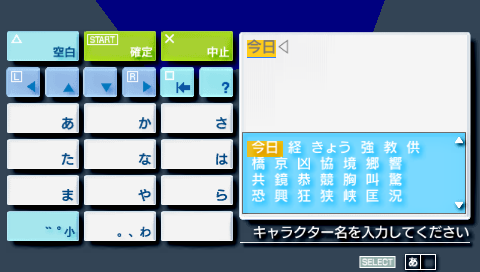
When you start typing hiragana/katakana and press triangle, it underlines the word and you get a selection of possible kanji for that word. I noticed this feature when I was entering a character name from the Japanese version of Tales of the World: Radiant Mythology. Anyway, to make a long story short, I used a memory dump of the game, searched for the string displayed in the dialog, and used a little math to figure out how they enabled it:
| Code: | | osk.unk_00 = 1; // Enable IME |
If you want my modified dialog sample: http://www.revworld.org/~cpuwhiz/psp/oskdialog.tar.gz |
|
| Back to top |
|
|
BenHur
Joined: 20 Oct 2007
Posts: 30
|
| Posted: Wed Nov 14, 2007 9:05 am Post subject: |
|
|
| Raphael wrote: | | That looks nice, hope you release it soon :) |
Here it is: intraFont - version 0.1
http://rapidshare.com/files/69530117/intraFont_0.1.zip.html
It's still in an early stage (not everything implemented and probably a few bugs), but it works. The archive contains samples for GU and graphics.h - just look at them to see how to use intraFont and read the readme.
(If you used pgeFont by InsertWittyName (http://insomniac.0x89.org) before: you'll feel right at home since intraFont uses parts of pgeFont - but intraFont doesn't need the freetype library!)
Have fun and let me know your comments,
BenHur
@CpuWhiz: Thank you for your nice explanation. It's exciting to write something in a language I have no clue whatsoever! :-) |
|
| Back to top |
|
|
Cpasjuste
Joined: 29 May 2005
Posts: 214
|
| Posted: Wed Nov 14, 2007 9:10 am Post subject: |
|
|
Many thanks BenHur, great work.
I will probably use it in a next app. |
|
| Back to top |
|
|
J.F.
Joined: 22 Feb 2004
Posts: 2906
|
| Posted: Wed Nov 14, 2007 4:02 pm Post subject: |
|
|
| BenHur wrote: | | Raphael wrote: | | That looks nice, hope you release it soon :) |
Here it is: intraFont - version 0.1
http://rapidshare.com/files/69530117/intraFont_0.1.zip.html
It's still in an early stage (not everything implemented and probably a few bugs), but it works. The archive contains samples for GU and graphics.h - just look at them to see how to use intraFont and read the readme.
(If you used pgeFont by InsertWittyName (http://insomniac.0x89.org) before: you'll feel right at home since intraFont uses parts of pgeFont - but intraFont doesn't need the freetype library!)
Have fun and let me know your comments,
BenHur
@CpuWhiz: Thank you for your nice explanation. It's exciting to write something in a language I have no clue whatsoever! :-) |
Wow! This REALLY works well! I've already put it in my app and it looks fantastic - night and day difference. One thing, it's not as useful without the text width function, so I went ahead and implemented and tested it for you. :)
| Code: | int intraFontMeasureText(intraFont *font, const char *text) {
if (!text || strlen(text) == 0 || !font) return 0;
unsigned short* ucs2_text = (unsigned short*)malloc((strlen(text)+1)*sizeof(unsigned short));
if (!ucs2_text) return 0;
int i;
for (i = 0; i < strlen(text); i++) ucs2_text[i] = text[i];
ucs2_text[i] = 0;
i = intraFontMeasureTextUCS2(font, ucs2_text);
free(ucs2_text);
return i;
}
int intraFontMeasureTextUCS2(intraFont *font, const unsigned short *text) {
if(!font) return 0;
int i;
int length = 0;
int x = 0;
float glyphscale = font->size;
while (text[length] > 0) length++;
if (length == 0) return 0;
for(i = 0; i < length; i++) {
unsigned short char_id = intraFontGetID(font,text[i]);
if (char_id >= font->n_chars) char_id = 0;
Glyph *glyph = &(font->glyph[char_id]);
if (!(glyph->flags & PGF_CACHED)) {
intraFontGetBMP(font,char_id,PGF_CHARGLYPH);
}
x += ((font->options & INTRAFONT_FIXEDWIDTH) ? font->advancex*0.5f : glyph->advance) * glyphscale / 4.0;
}
return x;
}
|
You don't HAVE to cache the glyph in this routine, but I figured if you're measuring the width of some text, you're almost certainly getting ready to print it, so go ahead and cache it. :) |
|
| Back to top |
|
|
KickinAezz
Joined: 03 Jun 2007
Posts: 328
|
| Posted: Sat Nov 17, 2007 8:09 am Post subject: |
|
|
Benhur,
Awesome work, Sony will be regretting this. [Disregard my prev. post :) ]
_________________
Intrigued by PSP system Since December 2006.
Use it more for Development than for Gaming. |
|
| Back to top |
|
|
|

 FAQ
FAQ Search
 Memberlist
 Usergroups
 Register
 Profile
 Log in to check your private messages
 Log in


