| View previous topic :: View next topic |
| Author |
Message |
The Tjalian

Joined: 06 Aug 2006
Posts: 18
|
 Posted: Mon Mar 17, 2008 9:35 am Post subject: Help with Cygwin please... Posted: Mon Mar 17, 2008 9:35 am Post subject: Help with Cygwin please... |
 |
|
Hey all. I've finally decided to get serious about programming on the PSP, to see what it can do, see what I can do on it, etc. I'm doing programming at Uni, and now I know my fair share of rookie game programming, I want to try my hand at PSP game development.
I've followed this tutorial which tells me how to set up Cygwin. I've installed all of the default packages, typed in these two commands in the command prompt:
echo "export PSPDEV=/usr/local/pspdev" >> ~/.bashrc
echo "export PATH=\$PATH:\$PSPDEV/bin" >> ~/.bashrc
and now I've been told to enter these commands:
svn co svn://svn.ps2dev.org/psp/trunk/psptoolchain
cd psptoolchain
./toolchain.sh
Only problem is, cygwin says svn isn't a recognised command. Are there any suggestions as to why it isn't a recognised command, and how to fix this issue?
Thanks.
_________________
 |
|
| Back to top |
|
 |
PiCkDaT
Joined: 04 Oct 2007
Posts: 69
|
| Posted: Mon Mar 17, 2008 1:48 pm Post subject: |
|
|
I had the same problem, I'm in the works of fixing it now. The problem I believe is that I downloaded an already built Cygwin and it didn't have all the subversion and automake etc. So I think you may have downloaded the same package I did. I found this helpful.
http://www.devsgen.com/index.php?option=com_content&task=blogcategory&id=18&Itemid=28&limit=8&limitstart=8
Number 1 is installing Cygwin(what I'm doing right now).
Number 2 is the toolchain.
_________________
Enlighten me, Reveal my fate -- Follow - Breaking Benjamin |
|
| Back to top |
|
|
The Tjalian
Joined: 06 Aug 2006
Posts: 18
|
| Posted: Wed Mar 19, 2008 2:24 am Post subject: |
|
|
Thanks for the reply :)
I'll try that now, thanks! :)
_________________
|
|
| Back to top |
|
|
PiCkDaT
Joined: 04 Oct 2007
Posts: 69
|
| Posted: Wed Mar 19, 2008 4:26 am Post subject: |
|
|
By the way.. it takes a long ass time.
_________________
Enlighten me, Reveal my fate -- Follow - Breaking Benjamin |
|
| Back to top |
|
|
The Tjalian
Joined: 06 Aug 2006
Posts: 18
|
| Posted: Wed Mar 19, 2008 4:59 am Post subject: |
|
|
Tell me something I don't know! Thank god I'm grabbing the files from my own Country!
It also helps I have a 10MB connection, hehe.
_________________
|
|
| Back to top |
|
|
PiCkDaT
Joined: 04 Oct 2007
Posts: 69
|
| Posted: Wed Mar 19, 2008 5:03 am Post subject: |
|
|
It downloads 400 meg for Cygwin. After that it takes about 20-30 minutes to install Cygwin. Then once you get it set up and checkout the toolchain from the svn and install it, it takes another several hours. What I did was installed Cygwin and then tried the toolchain but it gave me errors about 30 minutes into the install so I just put in the pre-compiled toolchain I had before in and it works fine :) just gotta update the PSPSDK.
_________________
Enlighten me, Reveal my fate -- Follow - Breaking Benjamin |
|
| Back to top |
|
|
The Tjalian
Joined: 06 Aug 2006
Posts: 18
|
| Posted: Wed Mar 19, 2008 12:17 pm Post subject: |
|
|
Guh, yet ANOTHER error. Damn this is annoying lol.
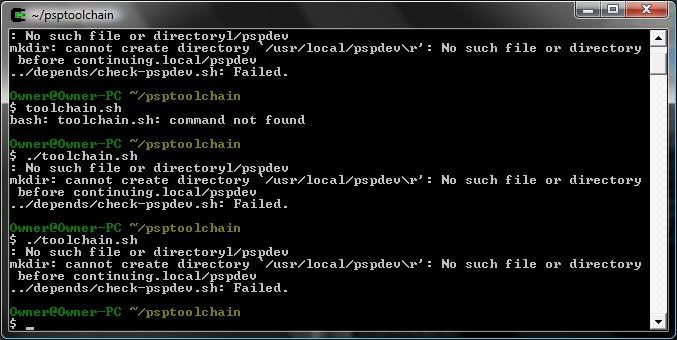
I've now made the directory /usr/local/pspdev/r but it doesn't make any difference. I've also added a blank file called r in /pspdev/ too, that doesn't work.
Any suggestions?
_________________
|
|
| Back to top |
|
|
jimparis
Joined: 10 Jun 2005
Posts: 1179
Location: Boston
|
| Posted: Wed Mar 19, 2008 12:33 pm Post subject: |
|
|
| Your line endings in toolchain.sh got messed up. Make sure it has Unix line endings. |
|
| Back to top |
|
|
PiCkDaT
Joined: 04 Oct 2007
Posts: 69
|
| Posted: Wed Mar 19, 2008 5:54 pm Post subject: |
|
|
add this to cygwin.bat above bash --login. except change it to your directory.. mine was F:/ Im running windows
set path=%path%;F:/cygwin/usr/local/pspdev/bin
set PSPDEV=/usr/local/pspdev
_________________
Enlighten me, Reveal my fate -- Follow - Breaking Benjamin |
|
| Back to top |
|
|
The Tjalian
Joined: 06 Aug 2006
Posts: 18
|
| Posted: Wed Mar 19, 2008 6:24 pm Post subject: |
|
|
| PiCkDaT wrote: | add this to cygwin.bat above bash --login. except change it to your directory.. mine was F:/ Im running windows
set path=%path%;F:/cygwin/usr/local/pspdev/bin
set PSPDEV=/usr/local/pspdev |
Ah, I added that to .bash_profile instead :P (It said to do so in the new tutorial posted in this thread).
Anyway, it's actually installing now, and shouldn't hopefully run into errors. Thanks all! You've been really helpful, I appreciate it :)
_________________
|
|
| Back to top |
|
|
The Tjalian
Joined: 06 Aug 2006
Posts: 18
|
| Posted: Wed Mar 19, 2008 8:33 pm Post subject: |
|
|
Ok, now I'm severely fucked off.
2 bloody hours into the installation, I come across this error:
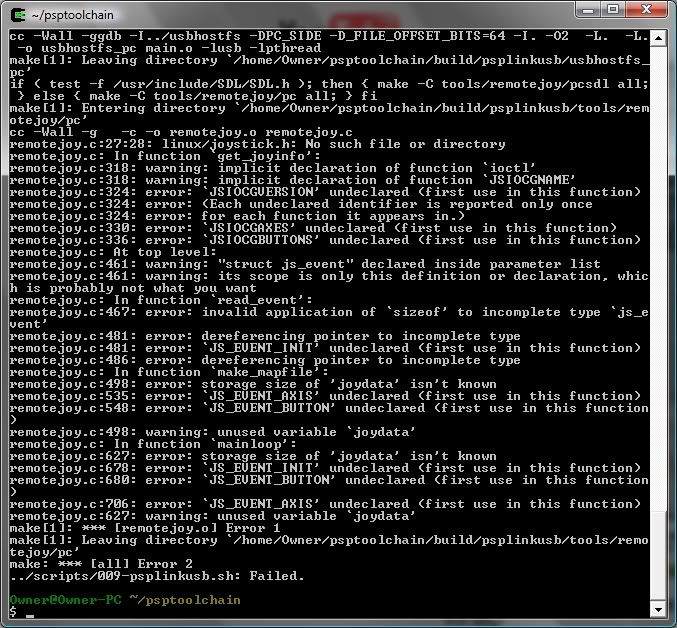
Once again, any suggestions? I don't understand why I'm getting so many errors. Are all cygwin installations like this?
_________________
|
|
| Back to top |
|
|
hibbyware
Joined: 28 Mar 2007
Posts: 78
|
| Posted: Wed Mar 19, 2008 9:32 pm Post subject: |
|
|
The PSPSDK has installed fine but psplinkusb never,
Type this in to cygwin after that error comes up make sure your already in the psptoolchain folder,
| Code: |
cd build/psplinkusb/
make && make release
|
This will build psplinkusb but you don't have to do this so only do it if you want to use psplinkusb, |
|
| Back to top |
|
|
cloudhunter
Joined: 17 Aug 2006
Posts: 86
|
| Posted: Thu Mar 20, 2008 2:18 am Post subject: |
|
|
| The Tjalian wrote: | Ok, now I'm severely fucked off.
2 bloody hours into the installation, I come across this error: |
I too was a bit pissed when I saw this error - but then realised that there was no problem. All I did to fix it was to install libusb, then installed all the steps after that.
Cloudy
_________________
:) |
|
| Back to top |
|
|
PiCkDaT
Joined: 04 Oct 2007
Posts: 69
|
| Posted: Thu Mar 20, 2008 3:40 am Post subject: |
|
|
ouch, well at least your toolchain installed.. after you get that done all you gotta do is install the SDK.. which btw isnt hard.
now all you gotta do is
svn co svn://svn.ps2dev.org/psp/trunk/pspsdk/
cd pspsdk
make
make install
all done :)
_________________
Enlighten me, Reveal my fate -- Follow - Breaking Benjamin |
|
| Back to top |
|
|
Insert_witty_name
Joined: 10 May 2006
Posts: 376
|
| Posted: Thu Mar 20, 2008 3:51 am Post subject: |
|
|
His SDK is installed fine.
As was already said, it's just the psplinkusb install which failed. |
|
| Back to top |
|
|
PiCkDaT
Joined: 04 Oct 2007
Posts: 69
|
| Posted: Thu Mar 20, 2008 6:42 am Post subject: |
|
|
IWN the SDK come's seperate from the toolchain doesn't it? ...
_________________
Enlighten me, Reveal my fate -- Follow - Breaking Benjamin |
|
| Back to top |
|
|
The Tjalian
Joined: 06 Aug 2006
Posts: 18
|
| Posted: Thu Mar 20, 2008 12:02 pm Post subject: |
|
|
Ok, so I followed hibbyware's advice (thanks for that), what do I need to do after that, or is that it?
By the way, what do you mean my SDK is installed? I thought I only installed the toolchain? I haven't got PSPSDK yet, or have I? I wanna confirm the SDK comes seperate from the toolchain before I install the SDK.
If this SDK *is* installed, where will it be in the cygwin folder?
_________________
|
|
| Back to top |
|
|
PiCkDaT
Joined: 04 Oct 2007
Posts: 69
|
| Posted: Fri Mar 21, 2008 5:23 am Post subject: |
|
|
I think its in cgywin/usr/local/pspsdk .. I could be wrong.. I'm not currently at my computer I'm at a friends. If its not there just do the commands I said above.
_________________
Enlighten me, Reveal my fate -- Follow - Breaking Benjamin |
|
| Back to top |
|
|
The Tjalian
Joined: 06 Aug 2006
Posts: 18
|
| Posted: Sat Mar 22, 2008 11:44 am Post subject: |
|
|
Fantastic, cheers.
_________________
|
|
| Back to top |
|
|
|

 FAQ
FAQ Search
 Memberlist
 Usergroups
 Register
 Profile
 Log in to check your private messages
 Log in


