| View previous topic :: View next topic |
| Author |
Message |
imhotep
Joined: 13 Dec 2005
Posts: 41
|
 Posted: Tue Jan 03, 2006 10:47 pm Post subject: Re: I's and Densha Otoko in PMP format Posted: Tue Jan 03, 2006 10:47 pm Post subject: Re: I's and Densha Otoko in PMP format |
 |
|
| reveine wrote: |
video: xvid 786 kbps cbr, 480x272 pixels, 29.97 fps
audio: mp3 160kbps cbr, 44,100 kHz
work. |
what encoding options? two-pass, etc.. please |
|
| Back to top |
|
 |
reveine

Joined: 03 Jan 2006
Posts: 14
|
| Posted: Tue Jan 03, 2006 10:53 pm Post subject: Re: I's and Densha Otoko in PMP format |
|
|
| imhotep wrote: | | reveine wrote: |
video: xvid 786 kbps cbr, 480x272 pixels, 29.97 fps
audio: mp3 160kbps cbr, 44,100 kHz
work. |
what encoding options? two-pass, etc.. please |
Xvid Configuration: (Using VirtualDubMod with Xvid codec)
Profile @ Level: AS@L5
Encoding Type: Single Pass
Target Bitrate: 768 kbps
Use defaults for other settings.
For audio stream: Save Wave (and then convert the wave to mp3 using besweet or belight)
After you finish saving wave, then disable the audio stream so that the conversion gets a lot faster. You will have a Xvid video file with no sound. The final step is to use PMP demux to combine Xvid video and Mp3 together.
Last edited by reveine on Tue Jan 03, 2006 11:05 pm; edited 3 times in total |
|
| Back to top |
|
|
imhotep
Joined: 13 Dec 2005
Posts: 41
|
| Posted: Tue Jan 03, 2006 10:57 pm Post subject: |
|
|
| ok, thanks. |
|
| Back to top |
|
|
imhotep
Joined: 13 Dec 2005
Posts: 41
|
| Posted: Tue Jan 03, 2006 10:58 pm Post subject: |
|
|
| ok, thanks. |
|
| Back to top |
|
|
xbox360
Joined: 03 Sep 2005
Posts: 12
|
| Posted: Tue Jan 03, 2006 11:00 pm Post subject: Re: I's and Densha Otoko in PMP format |
|
|
| reveine wrote: | | imhotep wrote: | | reveine wrote: |
video: xvid 786 kbps cbr, 480x272 pixels, 29.97 fps
audio: mp3 160kbps cbr, 44,100 kHz
work. |
what encoding options? two-pass, etc.. please |
Xvid Configuration:
Profile @ Level: AS@L5
Encoding Type: Single Pass
Target Bitrate: 768 kbps
Use defaults for other settings.
For audio stream: Save Wave (and then convert the wave to mp3 using besweet or belight)
After you finish saveing wave, then disable the audio stream so that the conversion gets a lot faster. You will have a Xvid video file with no sound. The final step is to use PMP demux to combine Xvid video and Mp3 together. |
hey,guy,and what software do u use??
can u use mencoder converting to pmp playable video |
|
| Back to top |
|
|
Mr.Modem
Joined: 21 Sep 2005
Posts: 28
|
| Posted: Tue Jan 03, 2006 11:00 pm Post subject: |
|
|
| This is brilliant Jonny, thanks! It took a while til I figured out how to use VirtualDub to output files in the right format but it was worth it. This is one of the best things that have happened to the PSP scene. |
|
| Back to top |
|
|
reveine
Joined: 03 Jan 2006
Posts: 14
|
| Posted: Tue Jan 03, 2006 11:03 pm Post subject: Re: I's and Densha Otoko in PMP format |
|
|
| xbox360 wrote: | hey,guy,and what software do u use??
can u use mencoder converting to pmp playable video |
Use VirtualDubMod and you need to install Xvid codec seperately. |
|
| Back to top |
|
|
jonny
Joined: 22 Sep 2005
Posts: 351
|
| Posted: Tue Jan 03, 2006 11:08 pm Post subject: |
|
|
@reveine:
i understand your excitement, but please, if the material is copyrighted, remove the links (i'm not able to verify this, so i leave this to you and mods)
@all:
i'm preparing answers for common questions/problems + a couple of suggestions to follow in order to make good problem reports (so i hope i don't have to ask the same things every time :)
cheers
jonny |
|
| Back to top |
|
|
arex
Joined: 18 Dec 2005
Posts: 23
|
| Posted: Tue Jan 03, 2006 11:14 pm Post subject: Re: I's and Densha Otoko in PMP format |
|
|
| xbox360 wrote: |
hey,guy,and what software do u use??
can u use mencoder converting to pmp playable video |
i found the sanme problem with you
i also use mencoder with winmenc, some videos, especially AVIs ->AVI can mux successful and play, but some can't play,and it display "pmp_lib_open:frames size can't be 0" |
|
| Back to top |
|
|
reveine
Joined: 03 Jan 2006
Posts: 14
|
| Posted: Tue Jan 03, 2006 11:16 pm Post subject: |
|
|
| jonny wrote: | @reveine:
i understand your excitement, but please, if the material is copyrighted, remove the links (i'm not able to verify this, so i leave this to you and mods) |
errr... I'm sorry if I cause you problem. I think since these series are not licensed anywhere outside Japan, it should be ok, but this is just my opinion. So i'll leave it up to mods to delete the links if they think it's not appropriate. |
|
| Back to top |
|
|
xbox360
Joined: 03 Sep 2005
Posts: 12
|
| Posted: Tue Jan 03, 2006 11:38 pm Post subject: |
|
|
sorry,im a newbee:) about conversion
audio codec is mp3 ??
i see somewhere using goldwave to convert to microsoft adpcm??is it right??:( |
|
| Back to top |
|
|
csuper
Joined: 03 Jan 2006
Posts: 103
|
| Posted: Tue Jan 03, 2006 11:41 pm Post subject: |
|
|
Jonny = Fullpsp Alchemist ! :)
Thanx Reveine for the working profile ! I will test that this evening...
Ps : another small request idea... possibilitie during the video to point at a specific time - like a resume pointer (for example the PSP manage to do it with MPEG4 and H264 file...)
Anyway... everybody here is amaze by your job :)
csuper. |
|
| Back to top |
|
|
Eternal-Blue
Joined: 03 Jan 2006
Posts: 3
|
| Posted: Wed Jan 04, 2006 12:12 am Post subject: |
|
|
x264 codec (avc/h264 like in firmware 2.0) dont work. error message is: First frame is no keyframe. Hope you add this at next version. It have better quality as xvid at lower bitrates.
PS: GOOD JOB :) |
|
| Back to top |
|
|
EdwardFMA

Joined: 06 Jul 2005
Posts: 40
|
| Posted: Wed Jan 04, 2006 12:58 am Post subject: |
|
|
Very nice I can now watch Bleach in full resolution on my PSP!
Also if it helps anyone i found VirtualDub Mod to be much easier than normal VirtualDub... I might make a tutorial depends *shrugs*
_________________
EdwardFMA/IchigoKurosaki - PSP Expert
Athlon 64 - Socket 939 - 3000+
1GB 333 DDR-Ram
Geforce 6600 GT PCI-Express
Orbis PSP Development
Open-Source Development |
|
| Back to top |
|
|
jonny
Joined: 22 Sep 2005
Posts: 351
|
| Posted: Wed Jan 04, 2006 1:04 am Post subject: |
|
|
i've tested x264, but not deeply.
it can't be used in the current player build.
iirc Baseline Profile was going around 18fps, Main Profile/High Profile around 8fps
this is the speed with no optimizations.
maybe i could get full speed with Baseline Profile after optimizations, but it's too early to talk about this.
PS: infos about profiles can be found here:
http://forum.doom9.org/showthread.php?t=96059
PPS: yes VirtualDubMod is probably more suited for the process (expecially audio demuxing)
http://sourceforge.net/projects/virtualdubmod |
|
| Back to top |
|
|
EdwardFMA
Joined: 06 Jul 2005
Posts: 40
|
| Posted: Wed Jan 04, 2006 2:59 am Post subject: |
|
|
How to Convert Audio and Video to PMP using VirtualDub Mod and Belight
1. Download VirtualDub Mod also Download XviD
2. Open VirtualDub Mod and go to [File]-[Open Video File...]
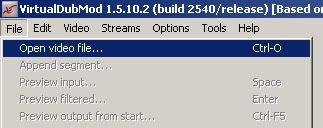
3. Select the File you want to convert (For this Example i'm useing Bleach Episode 62)
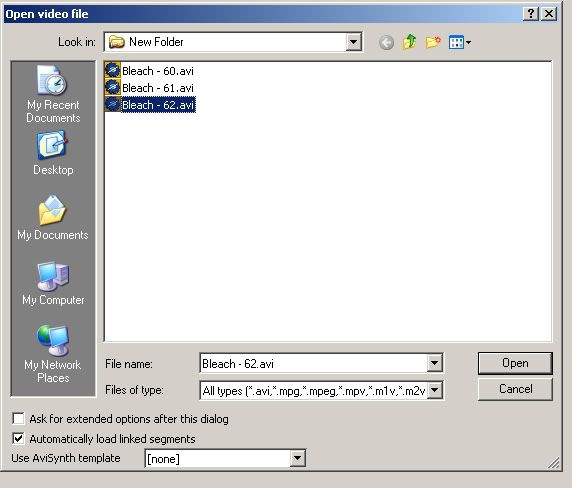
4. Next go to [Streams]-[Stream List]
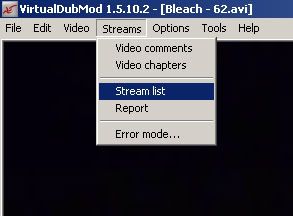
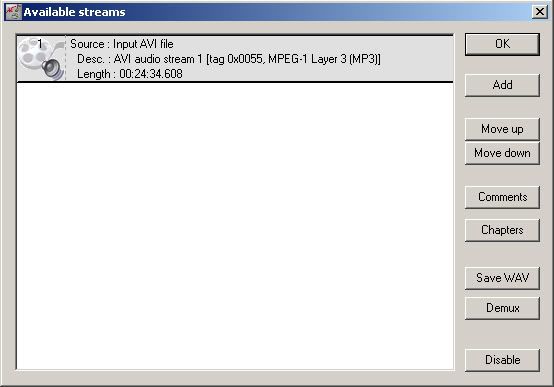
5. Next select the audio stream and click on [Disable]
6. Next go to [Video]-[Filters...]
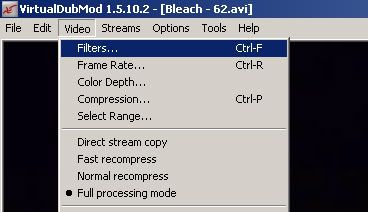
7. Then click on [Add]
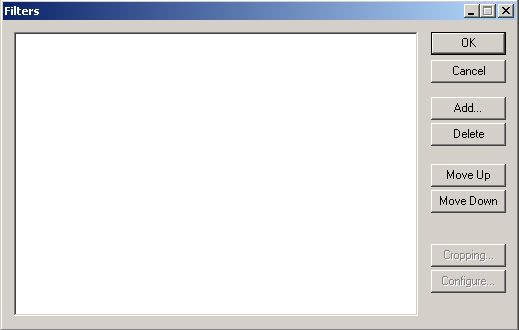
8. The select [Resize] and click [Ok]
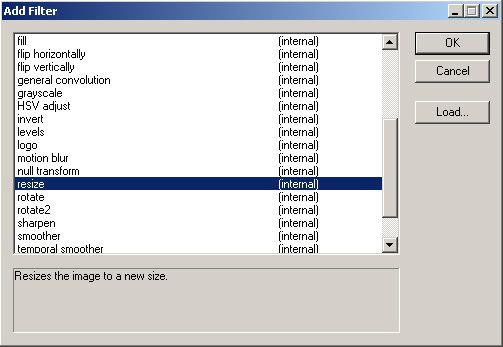
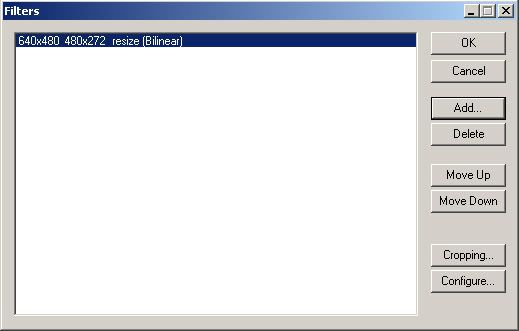
9. Then a dialog box should appear for resizeing change the width to [480] and the height to [272] I suggest [Bilinear], but you can play around with this to get it to look good...
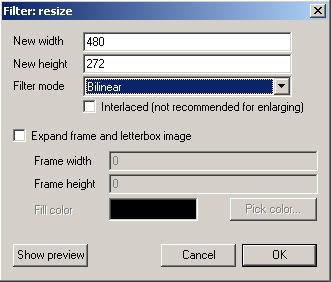
10. Now your [Filter...] Dialog Box should look like this once your done just click [Ok]
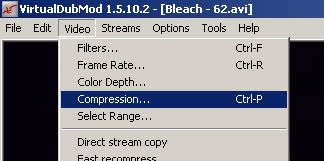
11. Now go to [Video]-[Compression]
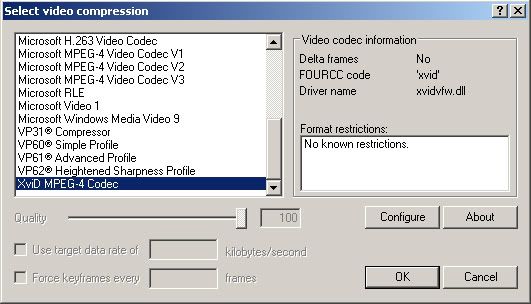
12. Then select [XviD MPEG-4 Codec] and click [Configure]
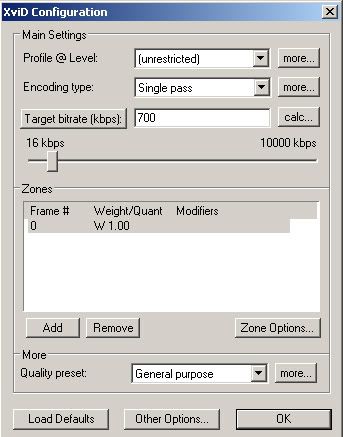
13. Then click [Load Defaults] in the [XviD Configuration] Dialog box and click on [more...] next to [Profile @ Level]
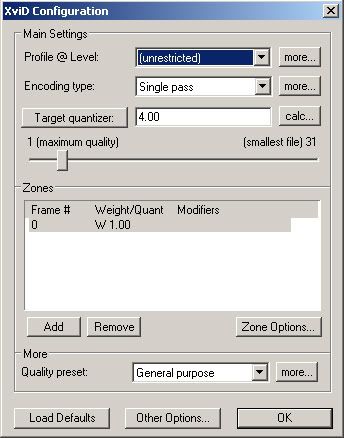
14. Next uncheck [B-VOPs] and click [Ok]
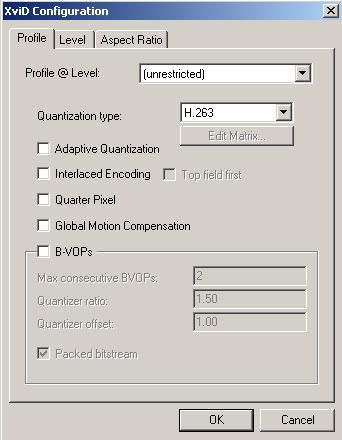
15. Then click [Target quantizer:] if you want to select the bitrate of your video once you are done just click [Ok]
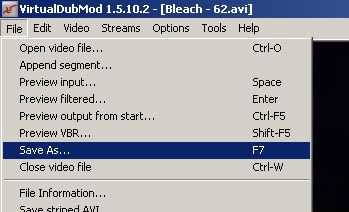
16. Next go to [File]-[Save As...] and save it
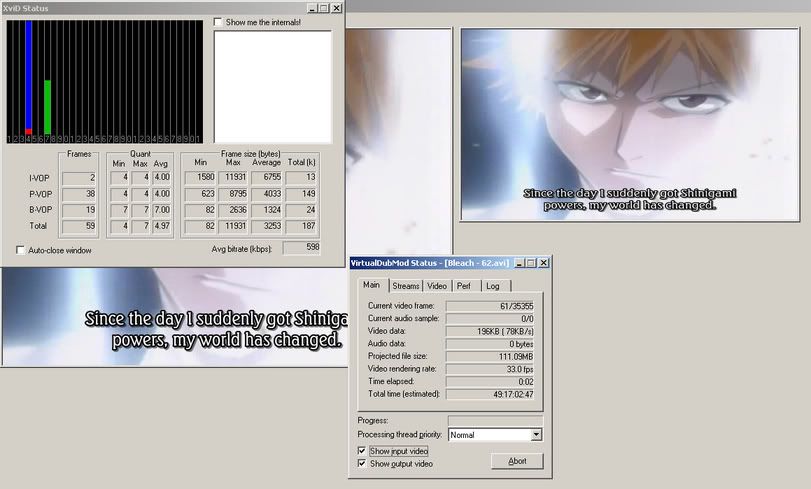
17. Now it should look something like this go take a break this took 13 Min. on my computer with this 30 Min. Episode...
18. Now for the Audio goto [File]-[Exit]
19. Download BeLight (I use the Stable Version)
20. Next Open up BeLight and match your settings to the one in the Image
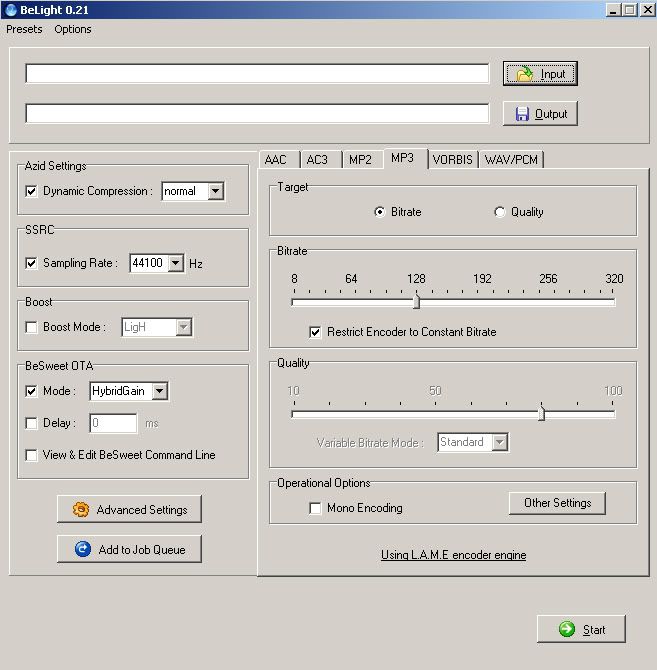
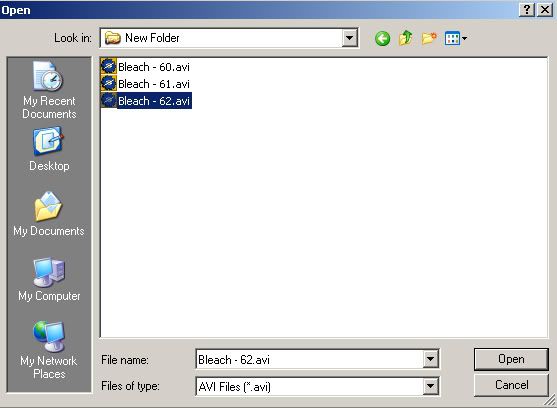
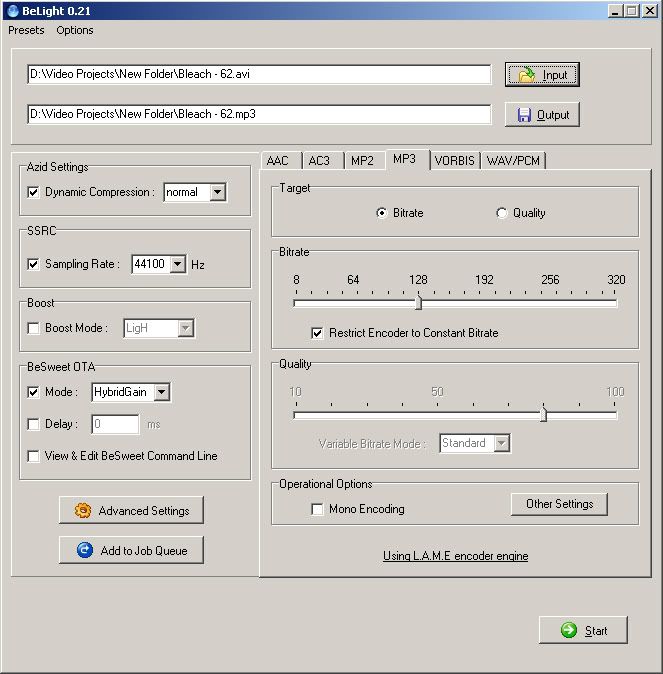
21. Then click [Input] and select [AVI Files (*.avi)] under [Files of type:] and select the video which you opened in [VirtualDub Mod] in step: 3
22. next just click [Start]
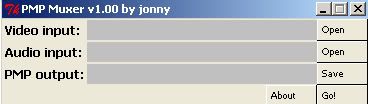
23. Once it's done just put both the [*.mp3] File made in step: 19 and the [*.avi] File made in step: 14 into PMP Muxer
_________________
EdwardFMA/IchigoKurosaki - PSP Expert
Athlon 64 - Socket 939 - 3000+
1GB 333 DDR-Ram
Geforce 6600 GT PCI-Express
Orbis PSP Development
Open-Source Development
Last edited by EdwardFMA on Wed Jan 04, 2006 12:16 pm; edited 2 times in total |
|
| Back to top |
|
|
jonny
Joined: 22 Sep 2005
Posts: 351
|
| Posted: Wed Jan 04, 2006 3:55 am Post subject: |
|
|
EdwardFMA, nice nick and nice tut :)
can you add a step about XviD config?
after step 12:
hit "Configure"
hit "Load Defaults" on XviD config
hit "more..." near "Profile @ Level", disable "B-VOPs" and close this window (this is optional, i'm discovering bframes are not so problematic in the current version)
hit "Target quantizer" if you want to change to non quality based mode and specify the bitrate you want to use
PS: if you convert everything to html+images and you send me everything, i'll be happy to include this tut on my site.
@imhotep:
"pmp_decode_open: audio_output_length != 4608"
do you cut the audio at start or something similar?
can you give me detailed infos about your audio encoding process (softs used with exact version number)? (the best thing for me is to replicate the same problem on my machine)
@everyone using BeLight and getting "sync lost" error:
are you sure you are using BeSweet v1.5b31?
(the only way i've found in order to get "sync lost" is using BeLight+BeSweet 1.4) |
|
| Back to top |
|
|
zacay
Joined: 17 Jul 2005
Posts: 10
|
| Posted: Wed Jan 04, 2006 4:14 am Post subject: |
|
|
GREAT WORK!!!
If I own a mac with OS X, how can I create PMP movies?
I should extract the video and audio from my avi files,
then resize and encode to xvid..
And then use a muxer? But is there one for os x? did you create it first in perl?
Thanx for your work!
I volunteer for graphics, as you know from last thread. |
|
| Back to top |
|
|
wracks
Joined: 04 Jan 2006
Posts: 3
|
| Posted: Wed Jan 04, 2006 4:33 am Post subject: |
|
|
Great tutorial EdwardFMA :)
I'm getting sound stuttering (from what I've read it's to avoid sync problems)
I used bilinear resize, Profile @ Level: AS@L5, Encoding Type: Single Pass, Target Bitrate: 768 kbps
mp3 constante bitrate, 128kbps
great player, hope to see it improve in the future :) |
|
| Back to top |
|
|
jonny
Joined: 22 Sep 2005
Posts: 351
|
| Posted: Wed Jan 04, 2006 4:48 am Post subject: |
|
|
@zacay:
you should find a Perl distribution for OS X, download the muxer source and run something like this in a shell:
perl pmp_muxer.pl video.avi audio.mp3 output.pmp
if you are enough lucky pmp_muxer_tk.pl (the script with graphical interface) will run too.
i'm no able to check this, i know about mp_muxer_tk.pl running on linux with some tiny modifications, but OS X is out of my realm :)
@wracks:
it's probably a too high fps and/or gmc and/or qpel |
|
| Back to top |
|
|
raptrex
Joined: 29 Sep 2005
Posts: 9
|
| Posted: Wed Jan 04, 2006 4:56 am Post subject: |
|
|
| after i use edwardfma's tutorial and put the audio and video in Jonny's muxer i got a vbr not supported error |
|
| Back to top |
|
|
jonny
Joined: 22 Sep 2005
Posts: 351
|
| Posted: Wed Jan 04, 2006 5:02 am Post subject: |
|
|
have you checked "Restrict Encoder to Costant Bitrate"?
what br are you using? |
|
| Back to top |
|
|
raptrex
Joined: 29 Sep 2005
Posts: 9
|
|
| Back to top |
|
|
wracks
Joined: 04 Jan 2006
Posts: 3
|
| Posted: Wed Jan 04, 2006 5:19 am Post subject: |
|
|
just got this:
| Code: | Error:
"pmp_decode_open: audio_output_lenght != 4608"
Press X |
I didn't do anything different from what Ive been doing so far (and it has been working). |
|
| Back to top |
|
|
JimmyZ
Joined: 29 Nov 2005
Posts: 11
|
| Posted: Wed Jan 04, 2006 5:39 am Post subject: got errors on playback |
|
|
i used a batch file like this:
mencoder "%1" -passlogfile "%2_PMP_2pass.log" -quiet -priority idle -nosound -vf scale=480:272 -ovc xvid -xvidencopts pass=1:vhq=4 -o nul
mencoder "%1" -passlogfile "%2_PMP_2pass.log" -quiet -priority idle -nosound -vf scale=480:272 -ovc xvid -xvidencopts pass=2:vhq=4:bitrate=640 -o "%2_PMP.avi"
mplayer "%1" -quiet -priority idle -novideo -ao pcm:file="%2_PMP.wav"
lame "%2_PMP.wav" -o "%2_PMP.mp3" -b 128
pmp_muxer "%2_PMP.avi" "%2_PMP.mp3" "%2.pmp"
but i only got an error msg like this: "pmp_lib_open: frame size can't be 0" |
|
| Back to top |
|
|
jonny
Joined: 22 Sep 2005
Posts: 351
|
| Posted: Wed Jan 04, 2006 5:41 am Post subject: |
|
|
| Quote: |
I didn't do anything different from what Ive been doing so far
|
i assume besweet+belight, is it right?
the problem seems to be related to excessive error checking :)
can you help me tracking this by running a test version? (i'll send you a PM if the answer is yes)
@raptrex:
thanks, i wait EdwardFMA permission before linking (maybe he want to shoot his html) |
|
| Back to top |
|
|
Theelise
Joined: 04 Jan 2006
Posts: 8
|
| Posted: Wed Jan 04, 2006 6:16 am Post subject: |
|
|
Hi Jonny/all,
Although the encoding is not a huge problem (have tried and tested the product and works fine for my dvd of LOST) congrats, well done and i must say the quality is quite drastically different when you see them side by side ;-),
1 question i have to anyone here is, it was far easier to just pump already existing avi's into 3gp or pspvideo9 or whatever, it is quick, easy and dirty but always gave good results and was great when leaving the house in a hurry.
Is there a way we can create a new ini for 3gp or settings for pspvideo9 etc to give the highest possbile quality such as
1500kbps video (or new maximum kbps reading)
320kbps Stereo mp3
Resolution 480x272
fps 29.97/23.97 (or whatever we need)
2pass Encoding
etc
etc
As i have the space on my psp and tend to chose quality over quantity (i understand not all will be wanting video of the highest possible quality) i would like to encode my dvd's etc all at the highest quality available in the quickest and easiest manner.
Again i am not complaining, nor do i have any problem encoding using VDM and i am not in any way questioning the PMP Mod, just curious for all the others who want easy drag and drop encoding at the highest possible quality. Is it possible as it is to encode now at standard res?
Cheers |
|
| Back to top |
|
|
wracks
Joined: 04 Jan 2006
Posts: 3
|
| Posted: Wed Jan 04, 2006 6:31 am Post subject: |
|
|
| jonny wrote: | | Quote: |
I didn't do anything different from what Ive been doing so far
|
i assume besweet+belight, is it right?
the problem seems to be related to excessive error checking :)
can you help me tracking this by running a test version? (i'll send you a PM if the answer is yes)
@raptrex:
thanks, i wait EdwardFMA permission before linking (maybe he want to shoot his html) |
yup, besweet+belight.
yeah, I'd like to help if possible :) |
|
| Back to top |
|
|
jonny
Joined: 22 Sep 2005
Posts: 351
|
| Posted: Wed Jan 04, 2006 6:35 am Post subject: |
|
|
@JimmyZ:
thanks for the detailed post, i've replicated the problem (i've never used mencoder), it seems something related to mencoder (VirtualDub+XviD never write frames with no data, while mencoder seems to do this!)
but i need more investigation :) |
|
| Back to top |
|
|
JimmyZ
Joined: 29 Nov 2005
Posts: 11
|
| Posted: Wed Jan 04, 2006 6:51 am Post subject: |
|
|
i tried both mplayer(with xvid 1.2.0dev) and/or vdubmod with xvid 1.1.0final, both fixed quantizer 3, audio by lame3.97beta with constant bitrate 128, none works for me,
muxing the mencoder output i got:
----------------------------------------
Processing video ...
3635 / 3635
dwTotalFrames: 3635
dwWidth: 480
dwHeight: 272
dwScale: 1 <-maybe this is wrong?
dwRate: 24
movi: 4112
Max: 38891
3635 / 3635
Processing audio ...
5802
5802
----------------------------------------
while playbacking, i got "pmp_lib_open: frame size can't be 0"
muxing the vdubmod output i got:
----------------------------------------
Processing video ...
3635 / 3635
dwTotalFrames: 3635
dwWidth: 480
dwHeight: 272
dwScale: 20833333 <-is this ok?
dwRate: 500000000 <-maybe this is wrong?
movi: 8208
Max: 55106
3635 / 3635
Processing audio ...
5802
5802
----------------------------------------
while playbacking, i got "pmp_lib_open: scale > 0xffffff"
i upload my files(official matrix2 trailer) here, hope this will help:
http://jimmyz.3322.org/try.mp3
http://jimmyz.3322.org/try_xvid1.1_vdm.avi
http://jimmyz.3322.org/try_xvid1.2_menc.avi
UPDATE: the mencoder encoded file has been updated to a -vf harddup enabled one, that solved the prob, credits goes to jimparis~
Last edited by JimmyZ on Wed Jan 04, 2006 7:26 am; edited 1 time in total |
|
| Back to top |
|
|
|

 FAQ
FAQ Search
 Memberlist
 Usergroups
 Register
 Profile
 Log in to check your private messages
 Log in


