| View previous topic :: View next topic |
| Author |
Message |
coolkehon
Joined: 20 Oct 2008
Posts: 355
|
 Posted: Fri Aug 14, 2009 1:21 pm Post subject: Maximum Texture Size Posted: Fri Aug 14, 2009 1:21 pm Post subject: Maximum Texture Size |
 |
|
what is the maximum size of a texture that the gu will accept. I plan on loading a lvl map background that will probably over a 1000x600 pixels and maybe more that will be bigger and i want to know if the gu will be able to handle this
edit: just tried it and it doesn't work on an image that is 992x504 so how can i fix this / work around it |
|
| Back to top |
|
 |
Dariusc123456
Joined: 12 Aug 2008
Posts: 394
|
| Posted: Fri Aug 14, 2009 2:54 pm Post subject: Re: Maximum Texture Size |
|
|
| coolkehon wrote: | what is the maximum size of a texture that the gu will accept. I plan on loading a lvl map background that will probably over a 1000x600 pixels and maybe more that will be bigger and i want to know if the gu will be able to handle this
edit: just tried it and it doesn't work on an image that is 992x504 so how can i fix this / work around it |
idk if this will help out or not but have you try to bring it down to 480x272? I know this is a stupid answer, but it might work.
_________________
PSHN - Playstation Hacking Network
PSX/PS1 - HACK - Game Shark
PS2 - HACK - Swap
PSP - HACK - Pandora
PS3 - ? |
|
| Back to top |
|
|
slasher2661996
Joined: 22 Feb 2009
Posts: 91
Location: Melbourne Australia ZOMG
|
| Posted: Fri Aug 14, 2009 3:46 pm Post subject: |
|
|
| don't load a massive image like that, load tiles of the big image |
|
| Back to top |
|
|
jojojoris
Joined: 30 Mar 2008
Posts: 261
|
| Posted: Fri Aug 14, 2009 7:05 pm Post subject: |
|
|
i read somewhere the maximum size was 512x512 px
_________________
| Code: | int main(){
SetupCallbacks();
makeNiceGame();
sceKernelExitGame();
} |
|
|
| Back to top |
|
|
coolkehon
Joined: 20 Oct 2008
Posts: 355
|
|
| Back to top |
|
|
jojojoris
Joined: 30 Mar 2008
Posts: 261
|
| Posted: Fri Aug 14, 2009 11:41 pm Post subject: |
|
|
You can split the image in seperate parts.
| Code: |
|--------|--------|
| | |
| 1 | 2 |
| | |
|--------+--------|
| | |
| 3 | 4 |
| | |
|--------|--------| |
BTW:
Why can't that image be tiled?
_________________
| Code: | int main(){
SetupCallbacks();
makeNiceGame();
sceKernelExitGame();
} |
|
|
| Back to top |
|
|
coolkehon
Joined: 20 Oct 2008
Posts: 355
|
| Posted: Fri Aug 14, 2009 11:42 pm Post subject: |
|
|
| i was just going to edit and say i did that with imagemagick. but how do i display those correctly. |
|
| Back to top |
|
|
jojojoris
Joined: 30 Mar 2008
Posts: 261
|
| Posted: Sat Aug 15, 2009 12:12 am Post subject: |
|
|
Simply draw those images at the rght place.
| Code: | Image1.x=0;
Image1.y=0;
Image2.x=totalwidth/2;
Image2.y=0;
Image3.x=0;
Image3.y=totalheight/2;
Image4.x=totalwidth/2;
Image4.y=totalheight/2;
drawImage(Image1);
drawImage(Image2);
drawImage(Image3);
drawImage(Image4);
|
_________________
| Code: | int main(){
SetupCallbacks();
makeNiceGame();
sceKernelExitGame();
} |
|
|
| Back to top |
|
|
coolkehon
Joined: 20 Oct 2008
Posts: 355
|
| Posted: Sat Aug 15, 2009 12:42 am Post subject: |
|
|
here is the function i was using but it is slow and leaves a gap in the images
| Code: | Location loc = start;
uint fnum_w = 0, fnum_h = 0;
for(vector<Image *>::iterator it = tiles.begin();
it != tiles.end();
it++)
{
if((*it) != NULL)
{
(*it)->moveTo(loc);
loc.x += (*it)->getWidth();
// cout << "Loc: " << loc.toString() << endl;
if(++fnum_w >= frames_wide )
{
fnum_w = 0;
if(++fnum_h >= frames_high)
break;
loc.x = start.x;
loc.y += (*it)->getHeight();
}
}
} |
|
|
| Back to top |
|
|
jojojoris
Joined: 30 Mar 2008
Posts: 261
|
| Posted: Sat Aug 15, 2009 1:51 am Post subject: |
|
|
Did you swizzle the images? (Enormous speedup)
How big is the gap between the parts?
_________________
| Code: | int main(){
SetupCallbacks();
makeNiceGame();
sceKernelExitGame();
} |
|
|
| Back to top |
|
|
coolkehon
Joined: 20 Oct 2008
Posts: 355
|
| Posted: Sat Aug 15, 2009 2:09 am Post subject: |
|
|
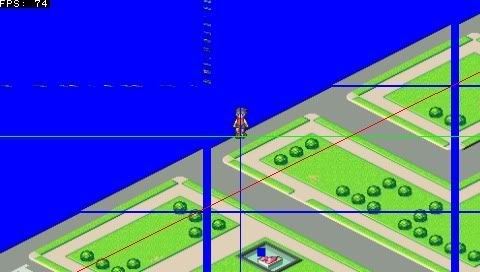
i just released the library so you can see where i've messed up (hopefully not) in the image rendering
here are some screenshots and i think it's because i'm drawing all of the images and they shouldn't be seen because of clipping but it's slowing it down
and i swizzled it and the speed went up but when moving it slows down again until i stop if i take out the vblank start it does 77 frames per second
ps: when i move i just update the image's location
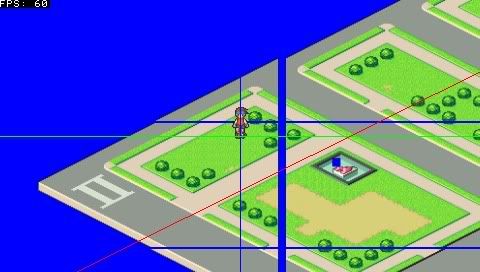
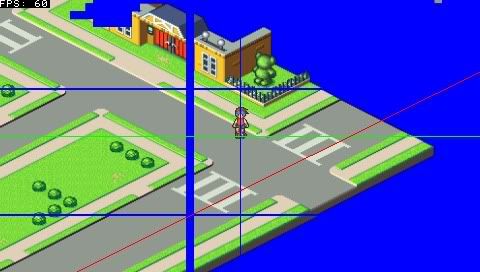
also there is something on this image although this one should be completly transparent it should have been in second image as well but it didn't show up for some reason in screenshot
 |
|
| Back to top |
|
|
coolkehon
Joined: 20 Oct 2008
Posts: 355
|
| Posted: Sat Aug 15, 2009 4:11 am Post subject: |
|
|
ok i changed the image because i was going to.
I changed the tile size to a power of 2 and now there aren't any gaps although i have no idea why having a power of 2 gets rid of gaps.
The images are all swizzled with each tile being 256x256.
The framerate is higher when stading still but when i start moving it drops below 60fps and there is also an issue with stray part of images being draw or the images being messed up
edit: how can i speed up the math because when i hide/don't render the image it is speeds up but when i do the math it is still slow. I believe its all that math that's happening which is a bunch of addition and maybe one or two divisions
here is how i move and update location
lan_hp is a Room
| Code: | Location next = lan_loc;
if(controls.held() & PSP_CTRL_RIGHT)
{
if(InsidePolygon(points.data(),points.size(),Location(next.x+speedx,next.y)) )
next.x += speedx;
}
if(controls.held() & PSP_CTRL_LEFT)
{
if(InsidePolygon(points.data(),points.size(),Location(next.x-speedx,next.y)))
next.x -= speedx;
}
if(controls.held() & PSP_CTRL_UP)
{
if(InsidePolygon(points.data(),points.size(),Location(next.x,next.y-speedy)))
next.y -=speedy;
}
if(controls.held() & PSP_CTRL_DOWN)
{
if(InsidePolygon(points.data(),points.size(),Location(next.x,next.y+speedy)))
next.y += speedy;
}
lan_walk->update();
if(next.x != lan_loc.x || next.y != lan_loc.y)
{
lan_loc = next;
// lan_hp.moveTo((480.0f/2.0f)-lan_loc.x,(272.0f/2.0f)-lan_loc.y);
lan_hp.moveTo(240.0f-lan_loc.x,136-lan_loc.y);
} |
this is Room::moveTo
| Code: | void Room::update()
{
Location loc = start;
uint fnum_w = 0, fnum_h = 0;
for(vector<Image *>::iterator it = tiles.begin();
it != tiles.end();
it++)
{
if((*it) != NULL)
{
(*it)->moveTo(loc);
cout << "Loc: " << loc.toString() << endl;
loc.x += (*it)->getWidth();
if(++fnum_w >= frames_wide )
{
fnum_w = 0;
if(++fnum_h >= frames_high)
break;
loc.x = start.x;
loc.y += (*it)->getHeight();
}
}
}
}
void Room::moveTo(Location loc)
{
if(loc.x != start.x || loc.y != start.y)
{
start = loc;
cout << "Room::moveTo " << start.toString() << endl;
update();
}
}
void Room::moveTo(float x, float y)
{
moveTo(Location(x,y));
} |
ex:
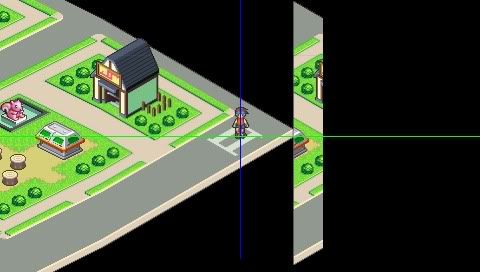
|
|
| Back to top |
|
|
coolkehon
Joined: 20 Oct 2008
Posts: 355
|
| Posted: Sat Aug 15, 2009 10:29 am Post subject: |
|
|
why does the gu have these weird problems drawing those images because i see no reason there should be extra parts drawn. and if the image doesn't appear on the screen what does it matter if i draw it to the screen. that shouldn't slow it down any
edit: i made all the tiles the same size that was a power of 2 (256x256) and it fixed the problem with the gaps and the extra drawings but why is it that it has to be a power of two because it waste valuable ram =( |
|
| Back to top |
|
|
unsigned int
Joined: 13 Aug 2009
Posts: 22
|
| Posted: Sat Aug 15, 2009 5:54 pm Post subject: |
|
|
I think the PSP only supports power of two textures. That is a limitation it shares with older graphics cards on the PC (e.g. there is an OpenGL extension ARB_texture_non_power_of_two from 2004 especially for supporting that).
You could further reduce the texture size to conserve memory.
If it slows down while moving, is it possible that you only do drawing when buttons get pressed? That would explain the speed difference. Not seeing the rest of the code I wonder if you maybe update the coordinates or draw the screen multiple times each frame instead of waiting for vsync. |
|
| Back to top |
|
|
coolkehon
Joined: 20 Oct 2008
Posts: 355
|
| Posted: Sat Aug 15, 2009 11:05 pm Post subject: |
|
|
| i only update the coordinates and i posted the update code. Room::update is called which does the coordinates and then the gu is started and the canvas which holds all the images which holds all the coordinates draws the images based on whatever coordinates are set at that time. |
|
| Back to top |
|
|
J.F.
Joined: 22 Feb 2004
Posts: 2906
|
| Posted: Sun Aug 16, 2009 1:05 am Post subject: |
|
|
| Comment out the cout << lines and see what happens. :) |
|
| Back to top |
|
|
coolkehon
Joined: 20 Oct 2008
Posts: 355
|
| Posted: Sun Aug 16, 2009 2:58 am Post subject: |
|
|
yeah their commented out
edit: it goes about 110 frames a second while not moving and 70 when moving. probably should have posted way earlier |
|
| Back to top |
|
|
Jim

Joined: 02 Jul 2005
Posts: 487
Location: Sydney
|
| Posted: Sun Aug 16, 2009 9:31 am Post subject: |
|
|
How do textures 'waste space' if they have to be powers of two?
Jim
_________________
http://www.dbfinteractive.com |
|
| Back to top |
|
|
J.F.
Joined: 22 Feb 2004
Posts: 2906
|
| Posted: Sun Aug 16, 2009 12:54 pm Post subject: |
|
|
| Well, the main difference between standing still and moving appears to be InsidePolygon(). You might want to check that function. In particular, make sure you aren't doing any double-precision math anywhere. The PSP does that in software as it can only do single precision in hardware. |
|
| Back to top |
|
|
coolkehon
Joined: 20 Oct 2008
Posts: 355
|
| Posted: Sun Aug 16, 2009 11:42 pm Post subject: |
|
|
inside polygon uses floats and here is the function
| Code: | bool InsidePolygon(Location* polygon, int N, Location p, int bound)
{
//cross points count of x
int __count = 0;
//neighbour bound vertices
Location p1, p2;
//left vertex
p1 = polygon[0];
//check all rays
for(int i = 1; i <= N; ++i)
{
//point is an vertex
if(p == p1) return bound;
//right vertex
p2 = polygon[i % N];
//ray is outside of our interests
if(p.y < MIN(p1.y, p2.y) || p.y > MAX(p1.y, p2.y))
{
//next ray left point
p1 = p2; continue;
}
//ray is crossing over by the algorithm (common part of)
if(p.y > MIN(p1.y, p2.y) && p.y < MAX(p1.y, p2.y))
{
//x is before of ray
if(p.x <= MAX(p1.x, p2.x))
{
//overlies on a horizontal ray
if(p1.y == p2.y && p.x >= MIN(p1.x, p2.x)) return bound;
//ray is vertical
if(p1.x == p2.x)
{
//overlies on a ray
if(p1.x == p.x) return bound;
//before ray
else ++__count;
}
//cross point on the left side
else
{
//cross point of x
double xinters = (p.y - p1.y) * (p2.x - p1.x) / (p2.y - p1.y) + p1.x;
//overlies on a ray
if(fabs(p.x - xinters) < __DBL_EPSILON__) return bound;
//before ray
if(p.x < xinters) ++__count;
}
}
}
//special case when ray is crossing through the vertex
else
{
//p crossing over p2
if(p.y == p2.y && p.x <= p2.x)
{
//next vertex
const Location& p3 = polygon[(i+1) % N];
//p.y lies between p1.y & p3.y
if(p.y >= MIN(p1.y, p3.y) && p.y <= MAX(p1.y, p3.y))
{
++__count;
}
else
{
__count += 2;
}
}
}
//next ray left point
p1 = p2;
}
bool INSIDE = true;
bool OUTSIDE = false;
//EVEN
if(__count % 2 == 0) return(OUTSIDE);
//ODD
else return(INSIDE);
} |
and as for how it was space say the image size would have been 130x130 at the very least. that would mean that it's size would have to be 256x256 so i waste almost twice the space |
|
| Back to top |
|
|
jbit
Site Admin

Joined: 28 May 2005
Posts: 293
Location: København, Danmark
|
| Posted: Mon Aug 17, 2009 12:05 am Post subject: |
|
|
| coolkehon wrote: | | and as for how it was space say the image size would have been 130x130 at the very least. that would mean that it's size would have to be 256x256 so i waste almost twice the space |
If you absolutely needed that size sprite then since this is 2d you'd just make the following textures: 128x128, 128x2, 2x128, and 2x2 then draw all four sprites at runtime. Most serious 2D engines will have an automated way to do this.
Working with systems requirements has always been a prerequisite of 2D art.
Last edited by jbit on Mon Aug 17, 2009 3:46 am; edited 1 time in total |
|
| Back to top |
|
|
J.F.
Joined: 22 Feb 2004
Posts: 2906
|
| Posted: Mon Aug 17, 2009 12:35 am Post subject: |
|
|
| Code: | //cross point of x
double xinters = (p.y - p1.y) * (p2.x - p1.x) / (p2.y - p1.y) + p1.x;
//overlies on a ray
if(fabs(p.x - xinters) < __DBL_EPSILON__) return bound;
|
Looks like double precision to me. |
|
| Back to top |
|
|
Jim
Joined: 02 Jul 2005
Posts: 487
Location: Sydney
|
| Posted: Mon Aug 17, 2009 7:56 am Post subject: |
|
|
The other solution to the 'wasted' space problem is to use the blank area for other, smaller, graphics and use the texture coordinates to pick out the bits you want.
Jim
_________________
http://www.dbfinteractive.com |
|
| Back to top |
|
|
coolkehon
Joined: 20 Oct 2008
Posts: 355
|
| Posted: Mon Aug 17, 2009 8:48 am Post subject: |
|
|
| J.F. wrote: | | Code: | //cross point of x
double xinters = (p.y - p1.y) * (p2.x - p1.x) / (p2.y - p1.y) + p1.x;
//overlies on a ray
if(fabs(p.x - xinters) < __DBL_EPSILON__) return bound;
|
Looks like double precision to me. |
oops i was trying another function and i posted it before i did find replace all fixed it
| Quote: | The other solution to the 'wasted' space problem is to use the blank area for other, smaller, graphics and use the texture coordinates to pick out the bits you want.
Jim |
loading lots of images and unloading sometimes. this seems to complicated |
|
| Back to top |
|
|
coolkehon
Joined: 20 Oct 2008
Posts: 355
|
| Posted: Wed Aug 19, 2009 2:05 am Post subject: |
|
|
the way i'm solving the texture problem is to resize the image file itself. is there another way i can solve this texture problem when loading and here is the function that loads a png. i tried always setting texture size to a power of two but that didn't work. why doesn't this work
| Code: | Image * ImageUtil::loadImageFilePNG(VirtualFile * fp, PixelFormat pixelFormat , bool swizzle, bool in_vram, DrawingCanvas * canvas)
{
if(fp == NULL || !is_png(fp))
return NULL;
Image * rimg = new Image(canvas);
rimg->image = (Image::ImageData *) malloc(sizeof(Image::ImageData));
if(rimg->image == NULL)
{
rimg->Delete();
return NULL;
}
Image::ImageData * image = rimg->image;
memset(image,0,sizeof(Image::ImageData));
image->pixelFormat = pixelFormat;
image->in_vram = in_vram;
png_structp png_ptr;
png_infop info_ptr;
png_ptr = png_create_read_struct(PNG_LIBPNG_VER_STRING,NULL,NULL,NULL);
if(png_ptr == NULL)
{
rimg->Delete();
return NULL;
}
info_ptr = png_create_info_struct(png_ptr);
if(info_ptr == NULL)
{
rimg->Delete();
png_destroy_read_struct(&png_ptr, NULL, NULL);
return NULL;
}
if (setjmp(png_jmpbuf(png_ptr)))
{
png_destroy_read_struct(&png_ptr, &info_ptr, NULL);
rimg->Delete();
return NULL;
}
png_set_read_fn(png_ptr,fp,(png_rw_ptr)ImageUtil_PNG_ReadFn);
// png_init_io(png_ptr, fp);
// png_set_sig_bytes(png_ptr, 8);
if(pixelWidths[pixelFormat] <= 8)
{
png_read_png(png_ptr,info_ptr,
PNG_TRANSFORM_STRIP_16 | PNG_TRANSFORM_PACKING | PNG_TRANSFORM_BGR, NULL );
}
else
{
png_read_png( png_ptr, info_ptr,
PNG_TRANSFORM_STRIP_16 | PNG_TRANSFORM_PACKING | PNG_TRANSFORM_EXPAND | PNG_TRANSFORM_BGR, NULL );
}
png_uint_32 width = info_ptr->width;
png_uint_32 height = info_ptr->height;
png_uint_32 depth = info_ptr->bit_depth;
int color_type = info_ptr->color_type;
png_byte **pRowTable = info_ptr->row_pointers;
unsigned char r=0, g=0, b=0, a=0;
int wantedPixelFormat = pixelFormat;
if (!info_ptr->num_palette && pixelWidths[pixelFormat] <= 8)
{
pixelFormat = GU_PSM_8888;
image->pixelFormat = pixelFormat;
image->in_vram = false;
}
else
{
image->pixelFormat = pixelFormat;
image->in_vram = in_vram;
}
image->width = width;
image->height = height;
image->swizzled = false;
if(image->width > 512)
image->textureWidth = image->width;
else
image->textureWidth = getNextPower2(image->width);
if(image->height > 512)
image->textureHeight = image->height;
else
image->textureHeight = getNextPower2(image->height);
image->size = (image->textureWidth * image->textureHeight * pixelWidths[image->pixelFormat]) >> 3;
if(image->in_vram)
image->data = (uint *)valloc(image->size);
else
image->data = (uint *)memalign(16,image->size);
if(image->data == NULL)
{
png_destroy_read_struct(&png_ptr, &info_ptr, NULL);
rimg->Delete();
return NULL;
}
if(pixelWidths[pixelFormat] <= 8)
{
image->palette = Image::CreatePalette(MIN(info_ptr->num_palette, 1 << paletteSizes[pixelFormat]), in_vram, GU_PSM_8888);
if(image->palette == NULL)
{
png_destroy_read_struct(&png_ptr, &info_ptr, NULL);
rimg->Delete();
return NULL;
}
info_ptr->num_palette = MIN(info_ptr->num_palette, image->palette->nentries);
for(int i = 0; i < info_ptr->num_palette; i++)
{
int r = info_ptr->palette[i].red;
int g = info_ptr->palette[i].green;
int b = info_ptr->palette[i].blue;
int a = 0xff;
}
sceKernelDcacheWritebackInvalidateRange(image->palette->data,image->palette->size);
}
u32 *p_dest4 = (u32*)image->data;
u16 *p_dest2 = (u16*)image->data;
u8 *p_dest1 = (u8*)image->data;
u32 x, y;
int color_per_entry = 8 / depth;
int color_offset, pixel_value = 0;
int mask = (1 << depth) - 1;
for ( y = 0; y < height; ++y )
{
const png_byte * pRow = pRowTable[y];
for ( x = 0; x < width; ++x )
{
switch ( color_type )
{
case PNG_COLOR_TYPE_GRAY:
r = g = b = *pRow++;
if ( r == 0 && g == 0 && b == 0 )
a = 0x00;
else
a = 0xff;
break;
case PNG_COLOR_TYPE_GRAY_ALPHA:
r = g = b = *pRow++;
if ( r == 0 && g == 0 && b == 0 )
a = 0x00;
else
a = 0xff;
pRow++;
break;
case PNG_COLOR_TYPE_RGB:
b = *pRow++;
g = *pRow++;
r = *pRow++;
a = 0xff;
break;
case PNG_COLOR_TYPE_RGB_ALPHA:
b = *pRow++;
g = *pRow++;
r = *pRow++;
a = *pRow++;
break;
case PNG_COLOR_TYPE_PALETTE:
color_offset = x % color_per_entry;
pixel_value = (*pRow >> (8 - depth * (color_offset + 1))) & mask;
if (x % color_per_entry == color_per_entry - 1)
pRow++;
if (image->palette)
{
r = (((u32*)image->palette->data)[pixel_value]) & 0xff;
g = ((((u32*)image->palette->data)[pixel_value]) >> 8) & 0xff;
b = ((((u32*)image->palette->data)[pixel_value]) >> 16) & 0xff;
a = ((((u32*)image->palette->data)[pixel_value]) >> 24) & 0xff;
}
else
{
b = info_ptr->palette[pixel_value].blue;
g = info_ptr->palette[pixel_value].green;
r = info_ptr->palette[pixel_value].red;
a = 0xff;
}
break;
}
if (pixelFormat == GU_PSM_8888)
p_dest4[x] = RGBA(r,g,b,a);
else if (pixelFormat == GU_PSM_5650)
p_dest2[x] = RGB16(r,g,b);
else if (pixelFormat == GU_PSM_5551)
p_dest2[x] = RGBA15(r,g,b,a);
else if (pixelFormat == GU_PSM_4444)
p_dest2[x] = RGBA12(r,g,b,a);
else if (pixelFormat == GU_PSM_T8)
p_dest1[x] = pixel_value;
else if (pixelFormat == GU_PSM_T4)
{
p_dest1[x >> 1] &= ~(15 << ((x & 1) << 2));
p_dest1[x >> 1] |= (pixel_value & 15) << ((x & 1) << 2);
}
}
p_dest1 += ( image->textureWidth * pixelWidths[pixelFormat]) >> 3;
p_dest2 += ( image->textureWidth );
p_dest4 += ( image->textureWidth );
}
sceKernelDcacheWritebackInvalidateRange(image->data,image->size);
rimg->setStart(Location(0,0));
rimg->setEnd(Location(image->width,image->height));
// TODO swizzle images and convert pixel formats
if(wantedPixelFormat != pixelFormat)
rimg = ImageUtil::convertImageTo(rimg,in_vram,wantedPixelFormat);
if(swizzle)
rimg->swizzle();
png_destroy_read_struct(&png_ptr, &info_ptr, NULL);
return rimg;
} |
|
|
| Back to top |
|
|
|

 FAQ
FAQ Search
 Memberlist
 Usergroups
 Register
 Profile
 Log in to check your private messages
 Log in


