| View previous topic :: View next topic |
| Author |
Message |
xxxstarmanxxx
Joined: 05 Jan 2006
Posts: 84
|
 Posted: Fri Jan 27, 2006 12:45 pm Post subject: Posted: Fri Jan 27, 2006 12:45 pm Post subject: |
 |
|
Here is my guide ;)
Tools needed:
Avisynth 2.5.6a
http://sourceforge.net/project/showfiles.php?group_id=57023&package_id=72557&release_id=366697
VurtualdubMOD
http://sourceforge.net/project/showfiles.php?group_id=65889&package_id=63653&release_id=352709
Step 1 - Make an avs script - or just use this one:
DirectShowSource("X:\myvob.vob")
KillAudio
Sharpen(1.0)
Lanczos4Resize(480, 272)
X is your drive letter - my vob is your source - could even be avi if thats what you're using.
Copy and paste the above 4 lines into a notepad txt file and rename the extension .avs
Step 2 - Load virtualdubMOD and open the .avs file - you will see your source load and the resize and sharpen filter applied.
If you need to crop - the easiest way is now to add null transform filter in vdub and crop. OR if you know about DVD2AVI_nic - this can do it for you and generate an avs script.
Step 3 - Setup compression in vdub - setup xvid codec with no options enabled - No qpel - No B-VOP - No Adaptive - No GMC - Absolutely nothing!
Setup each of the 2 passes using the quantisizer 4.0 - you dont need to bother setting the bitrate - the quantisizer will take care of it.
Remember when you save each pass to tick the 'dont run this job now' so both pass 1 and pass 2 go to the jobs list. Also remember to give each pass a different name.
NOTE: the higher you move the quant value - the smaller your encode will be and a rough estimate is as follows:
quant 4=1400kbs
quant 5=1200kbs
quant 6=1000kbs
quant 7=850kbs
But it can really depend on your source.....
Step 4 - In vdub goto job control and start the encoding.......
Step 5 - Using your prefered audio converter - mine is belight rip a 128kbs mp3 of your sources audio.
Step 6 - Mux the pass 2 avi and mp3 - your done!
My net connection has been down most of the day thanks to BT so I haven't had time to upload much - but here is a quant 4 encode of the Blade trinity trailer which comes in at 1400kbs.
One 3rd smaller than the 2000kbs bitrate encode, this file is better quality and much smaller.
Blade.Trinity.PURE.Quant4.pmp 24.2mb 2.11 secs
http://download.filefront.com/4672727;15cf934f0b1b92ca9c66bc3aee6bb22339fe2e336e30ec9a969bf087e0f3e2a1d7fef5fcd266f720
Note: Remember that the resize and sharpen filter are applied in YUY colour field - That means that before any encoding starts the source file is not degraded in any way - only enhanced - THIS IS NOT THE CASE WITH FILTERS IN VDUB OR ANY OTHER ENCODING METHOD! - All other encoder apply filters as they are encoding - thus reducing quality and increasing encode time.
I hope you all find this of help - I'm very pleased with the results so far and have uninstalled DIVX6 from my machine..........
All the best
J.
Last edited by xxxstarmanxxx on Fri Jan 27, 2006 12:53 pm; edited 2 times in total |
|
| Back to top |
|
 |
xxxstarmanxxx
Joined: 05 Jan 2006
Posts: 84
|
| Posted: Fri Jan 27, 2006 12:49 pm Post subject: |
|
|
| zshadow wrote: | does xvid even support more than 2 passes? if so, please tell me how because I thought it was limited to 2 pass.
for the record, I encoded a 2-pass episode of "24" at 2598kbps / 128kbps audio, no stuttering at all. however, movie files are larger than tv shows, so possibly that affects disk performance, i am not sure.
i'll upload a sample later on to show you guys. |
2598kbs??? your quantisizer is too high - change it to 4.0 or lower your target bitrate for movies.
I believe if you just keep adding the second pass to the jobs list in VDUB it will continue for as many passes as you like - However your file size will not reduce - the quality will just improve.
Hope that helps
J. |
|
| Back to top |
|
|
zshadow
Joined: 26 Dec 2005
Posts: 42
|
| Posted: Fri Jan 27, 2006 1:26 pm Post subject: |
|
|
| xxxstarmanxxx wrote: | | zshadow wrote: | does xvid even support more than 2 passes? if so, please tell me how because I thought it was limited to 2 pass.
for the record, I encoded a 2-pass episode of "24" at 2598kbps / 128kbps audio, no stuttering at all. however, movie files are larger than tv shows, so possibly that affects disk performance, i am not sure.
i'll upload a sample later on to show you guys. |
2598kbs??? your quantisizer is too high - change it to 4.0 or lower your target bitrate for movies.
I believe if you just keep adding the second pass to the jobs list in VDUB it will continue for as many passes as you like - However your file size will not reduce - the quality will just improve.
Hope that helps
J. |
thanks, I will try that.
btw.. yea, well 2598kbps gave me pretty much no noticeable artifacts at all (I was encoding from a high res hdtv source). may be a little too high, but it looks great. |
|
| Back to top |
|
|
psp360
Joined: 21 Aug 2005
Posts: 25
|
| Posted: Fri Jan 27, 2006 3:59 pm Post subject: |
|
|
| @xxxstarmanxxx I just DL and watched your Blade.Trinity.PURE.Quant4.pmp. I like what I see and would try your methods on a full movie, I can live with theses results (nice eye candy and no audio issues) and intend to build on them as I learn more about the tools you suggested. Thanks for your guide and keep up the work:) |
|
| Back to top |
|
|
wooolF

Joined: 12 Jan 2006
Posts: 146
|
| Posted: Fri Jan 27, 2006 5:27 pm Post subject: |
|
|
| Raphael wrote: | | You like tripple-posting, don't you wooolF? You should try getting along with editing unless you're just keen on getting a lot of posts quickly :P |
For god's sake... be my guest and remove the post count =) See if I care, really ;)
| Eingang wrote: | | If I would cut out a special scene and send you (as a download) would you encode it in your way for me, as I would be interested in the results.. ??? |
Sure deal =) I'll be back Monday evening, then I can try your material =) Posting now from my job =)
_________________
Guide/tutorial for converting DVD (and other normal files) to PMP at best quality possible (works for me) avoiding the usual audio stuttering and ghosting problems.
http://maxt.dk/archives/2006/02/01/dvd-to-psp/ |
|
| Back to top |
|
|
xxxstarmanxxx
Joined: 05 Jan 2006
Posts: 84
|
| Posted: Fri Jan 27, 2006 9:17 pm Post subject: |
|
|
Hi all - Here is a low bitrate encode using my method:
Blade.Trinity.Trailer.PURE.Bitrate768.pmp 13.5mb
http://download.filefront.com/4674179;15cf934f0b1b92ca9c66bc3aee6bb22339fe2e336e30ec9a969bf087e0f3e2a1d7fef5fcd266f720
Another 10mb average knocked off this encode with what I think is an acceptable quality loss/size.
I think over the duration of a full movie - this would work very well.
These will give you an idea about the quality of the resize filter I'm using.
I have also been experimenting with a filter called "undot" which helps with ghosting - but at the mo it doesn't look like it performs well with the "sharpen" filter - no matter which order they are in. Using it without "sharpen" produces a divx like encode - which is not at all bad - especially for long movies.
I'm going to rip the full movie at this rate and see how it is.
More tests on the trailer later this evening.
All the best.
J. |
|
| Back to top |
|
|
xxxstarmanxxx
Joined: 05 Jan 2006
Posts: 84
|
| Posted: Fri Jan 27, 2006 9:26 pm Post subject: |
|
|
@wooolf.
Is there any way I could get hold of your Matrix scene mate - as I haven't got that movie.
It would be good to see how my method holds up to that orgasm scene???
All the best
J. |
|
| Back to top |
|
|
wooolF
Joined: 12 Jan 2006
Posts: 146
|
| Posted: Fri Jan 27, 2006 9:51 pm Post subject: |
|
|
| xxxstarmanxxx wrote: | @wooolf.
Is there any way I could get hold of your Matrix scene mate - as I haven't got that movie.
It would be good to see how my method holds up to that orgasm scene??? |
Yeh, I could up it, but I wont be home until Monday evening... So I'll take the VOB with me Monday evening and I'll up it from my job Tuesday. =)
_________________
Guide/tutorial for converting DVD (and other normal files) to PMP at best quality possible (works for me) avoiding the usual audio stuttering and ghosting problems.
http://maxt.dk/archives/2006/02/01/dvd-to-psp/ |
|
| Back to top |
|
|
xxxstarmanxxx
Joined: 05 Jan 2006
Posts: 84
|
| Posted: Fri Jan 27, 2006 9:57 pm Post subject: |
|
|
| wooolF wrote: | | xxxstarmanxxx wrote: | @wooolf.
Is there any way I could get hold of your Matrix scene mate - as I haven't got that movie.
It would be good to see how my method holds up to that orgasm scene??? |
Yeh, I could up it, but I wont be home until Monday evening... So I'll take the VOB with me Monday evening and I'll up it from my job Tuesday. =) |
Thanks ever so much mate.
Have a good break - All the best
J. |
|
| Back to top |
|
|
xxxstarmanxxx
Joined: 05 Jan 2006
Posts: 84
|
| Posted: Fri Jan 27, 2006 10:29 pm Post subject: |
|
|
| xxxstarmanxxx wrote: | Hi all - Here is a low bitrate encode using my method:
Blade.Trinity.Trailer.PURE.Bitrate768.pmp 13.5mb
http://download.filefront.com/4674179;15cf934f0b1b92ca9c66bc3aee6bb22339fe2e336e30ec9a969bf087e0f3e2a1d7fef5fcd266f720
Another 10mb average knocked off this encode with what I think is an acceptable quality loss/size.
I think over the duration of a full movie - this would work very well.
These will give you an idea about the quality of the resize filter I'm using.
I have also been experimenting with a filter called "undot" which helps with ghosting - but at the mo it doesn't look like it performs well with the "sharpen" filter - no matter which order they are in. Using it without "sharpen" produces a divx like encode - which is not at all bad - especially for long movies.
I'm going to rip the full movie at this rate and see how it is - but obviously I cant post the movie. You'll have to try your own encodes with my method.
More tests on the trailer later this evening.
All the best.
J. |
|
|
| Back to top |
|
|
psp360
Joined: 21 Aug 2005
Posts: 25
|
| Posted: Fri Jan 27, 2006 10:53 pm Post subject: |
|
|
| xxxstarmanxxx if you need the matrix clip any sooner let me know. I have all the DVD. But I have to admit I am not that big of a matrix's fan so I don't know which disk to rip...so let me know, I could upload for you later this evening...it is now 8:59am in my country:) |
|
| Back to top |
|
|
NSCXP2005
Joined: 28 Jan 2006
Posts: 8
|
| Posted: Sat Jan 28, 2006 1:06 am Post subject: |
|
|
| wooolF wrote: | | Already posted mine ;D |
Hello M8
What page did you post your guide?
can u plz let me know.
Cheers
NSCXP2005 |
|
| Back to top |
|
|
Seamonster
Joined: 28 Jan 2006
Posts: 2
|
| Posted: Sat Jan 28, 2006 1:32 am Post subject: |
|
|
@xxxstarmanxxx
Thanks for your suggested settings for the Blade trailer - I'm trying them out now on an episode of Lost to see how it looks with a DivX source.
One problem I have is that when I go to select the 2nd-pass for Xvid I don't see the option for setting a quantizer level. All I can choose between is either a target size or a target bitrate. I know I could just use these, but I want to replicate your settings exactly to see what quality I get. Is there another setting I have to change to enable the quantizer settings?
(Also, I've never used AVISynth before and I've noticed that for this DivX file I have to use 'AVISource' instead of 'DirectShowSource' in order to get VDub to open the .avs file. Probably old news to most people here, but I thought I'd mention it.) |
|
| Back to top |
|
|
csuper
Joined: 03 Jan 2006
Posts: 103
|
| Posted: Sat Jan 28, 2006 4:36 am Post subject: |
|
|
@xxxstarmanxxx
May I ask for the .vcf file that you can dump will all the preset in virtualdub ?
You can ouput your file CTR^S ...
Thanx.
I don't get the 2 pass in the JOB queue, what i'm doing wrong ?
_________________
-----------
Now using PMP Mod 1.02 with some nice FPS gain with my slow SONY MS...
Thanx Jonny ! & Malloc ! & Raphael ! |
|
| Back to top |
|
|
k0nan
Joined: 03 Jan 2006
Posts: 36
|
| Posted: Sat Jan 28, 2006 5:17 am Post subject: |
|
|
| xxxstarmanxxx wrote: |
Thanks for your suggested settings for the Blade trailer - I'm trying them out now on an episode of Lost to see how it looks with a DivX source. |
I converted this week's Lost (xvid source), nothing fancy just 2-pass divx (lavc to be precise) in Winmenc, 900kpbs, vhq, lancoz, 280MBs, quality was A+ excellent. There was little fast movement the whole ep, so it came out very crisp & detailed with no bleeding or audio stutters. I normally watch it in HD on my gf's plasma, but the PMP experience was like having a mini-plasma on the train. :)
I didn't apply the sharpening filter, I'm not really sure how necessary or effective that would be using a non-DVD source. I'll edit some clips and run some side-by-side tests this weekend, but for now 900kpbs 2-pass is perfect for TV eps. |
|
| Back to top |
|
|
zshadow
Joined: 26 Dec 2005
Posts: 42
|
| Posted: Sat Jan 28, 2006 6:42 am Post subject: |
|
|
| xxxstarmanxxx wrote: | | zshadow wrote: | does xvid even support more than 2 passes? if so, please tell me how because I thought it was limited to 2 pass.
for the record, I encoded a 2-pass episode of "24" at 2598kbps / 128kbps audio, no stuttering at all. however, movie files are larger than tv shows, so possibly that affects disk performance, i am not sure.
i'll upload a sample later on to show you guys. |
2598kbs??? your quantisizer is too high - change it to 4.0 or lower your target bitrate for movies.
I believe if you just keep adding the second pass to the jobs list in VDUB it will continue for as many passes as you like - However your file size will not reduce - the quality will just improve.
Hope that helps
J. |
does not work -- i quened the file 7 times, and it did output more avi files but they were the same exact size, so i did an md5 check and they all turned out to be the same. |
|
| Back to top |
|
|
Eingang
Joined: 04 Jan 2006
Posts: 59
|
| Posted: Sat Jan 28, 2006 8:31 am Post subject: |
|
|
@starman....
VDMod does not want to open my vob file... it just says "Avisynth open failure - Avisynth open script failed" .....
Any idea what I´m doing wrong ? |
|
| Back to top |
|
|
xxxstarmanxxx
Joined: 05 Jan 2006
Posts: 84
|
| Posted: Sat Jan 28, 2006 9:49 am Post subject: |
|
|
| Seamonster wrote: | @xxxstarmanxxx
Thanks for your suggested settings for the Blade trailer - I'm trying them out now on an episode of Lost to see how it looks with a DivX source.
One problem I have is that when I go to select the 2nd-pass for Xvid I don't see the option for setting a quantizer level. All I can choose between is either a target size or a target bitrate. I know I could just use these, but I want to replicate your settings exactly to see what quality I get. Is there another setting I have to change to enable the quantizer settings?
(Also, I've never used AVISynth before and I've noticed that for this DivX file I have to use 'AVISource' instead of 'DirectShowSource' in order to get VDub to open the .avs file. Probably old news to most people here, but I thought I'd mention it.) |
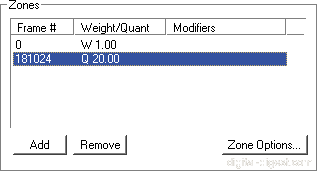
Double click on the Weight 1.0 and change it to quantizer and pick your prefered number.
Ignore the second line on this pic - I just ripped it from another site.
Sorry - you were right about the syntax for avi's - I dont use them personally.
Hope that helps
J. |
|
| Back to top |
|
|
xxxstarmanxxx
Joined: 05 Jan 2006
Posts: 84
|
| Posted: Sat Jan 28, 2006 9:55 am Post subject: |
|
|
| psp360 wrote: | | xxxstarmanxxx if you need the matrix clip any sooner let me know. I have all the DVD. But I have to admit I am not that big of a matrix's fan so I don't know which disk to rip...so let me know, I could upload for you later this evening...it is now 8:59am in my country:) |
Hi mate - that would be a great help to me but only if you have the time - I need the vob file containing the scene - which may need an upload of over 1gb - unless you know how to just rip the chapter (I dont :( ) but if you have the connection - and the time - I'll grab it and test it to hell and back.
Thanks in advance
J. |
|
| Back to top |
|
|
xxxstarmanxxx
Joined: 05 Jan 2006
Posts: 84
|
| Posted: Sat Jan 28, 2006 9:56 am Post subject: |
|
|
| Eingang wrote: | @starman....
VDMod does not want to open my vob file... it just says "Avisynth open failure - Avisynth open script failed" .....
Any idea what I´m doing wrong ? |
Post your script mate - Open the AVS file in note pad and copy/paste it here - I'll have a look.
J. |
|
| Back to top |
|
|
xxxstarmanxxx
Joined: 05 Jan 2006
Posts: 84
|
| Posted: Sat Jan 28, 2006 10:09 am Post subject: |
|
|
| csuper wrote: | @xxxstarmanxxx
May I ask for the .vcf file that you can dump will all the preset in virtualdub ?
You can ouput your file CTR^S ...
Thanx.
I don't get the 2 pass in the JOB queue, what i'm doing wrong ? |
Hello.
The contents of my .vcf file is as follows -
VirtualDub.RemoveInputStreams();
VirtualDub.video.DeleteComments(1);
VirtualDub.video.AdjustChapters(1);
VirtualDub.video.SetDepth(24,24);
VirtualDub.video.SetMode(3);
VirtualDub.video.SetFrameRate(0,1);
VirtualDub.video.SetIVTC(0,0,-1,0);
VirtualDub.video.SetCompression();
VirtualDub.video.filters.Clear();
That wont be much help to you as no filters are applied during encoding with Vdub.
My filter are applied using avisynth to pre-process without degrading the original source as follows:
LoadPlugin("C:\Program Files\DVD2AVI_NIC\System\DGDecode.DLL")
MPEG2Source("E:\test.d2v").Crop(4,16,712,548)
Sharpen(1.0)
Lanczos4Resize(480, 272)
NOTE: the DGDecode Vob plugin is only available using DVD2AVI_nic - which is a mod of the original dvd2avi.
I use the DGDecode plugin as DVD2AVI can sometimes be a bit buggy about frame times with vobs.
I would encourage anyone having crop/resize issuies to use this program as it actually shows you your Lanczos4Resise in realtime - That way you know your aspect ratio is correct.
Hope that helps
J. |
|
| Back to top |
|
|
xxxstarmanxxx
Joined: 05 Jan 2006
Posts: 84
|
| Posted: Sat Jan 28, 2006 10:18 am Post subject: |
|
|
| zshadow wrote: | | xxxstarmanxxx wrote: | | zshadow wrote: | does xvid even support more than 2 passes? if so, please tell me how because I thought it was limited to 2 pass.
for the record, I encoded a 2-pass episode of "24" at 2598kbps / 128kbps audio, no stuttering at all. however, movie files are larger than tv shows, so possibly that affects disk performance, i am not sure.
i'll upload a sample later on to show you guys. |
2598kbs??? your quantisizer is too high - change it to 4.0 or lower your target bitrate for movies.
I believe if you just keep adding the second pass to the jobs list in VDUB it will continue for as many passes as you like - However your file size will not reduce - the quality will just improve.
Hope that helps
J. |
does not work -- i quened the file 7 times, and it did output more avi files but they were the same exact size, so i did an md5 check and they all turned out to be the same. |
Sorry mate - I checked and double checked this evening and it appears only DivX supports multi passes.
J. |
|
| Back to top |
|
|
xxxstarmanxxx
Joined: 05 Jan 2006
Posts: 84
|
| Posted: Sat Jan 28, 2006 10:24 am Post subject: |
|
|
| k0nan wrote: | | xxxstarmanxxx wrote: |
Thanks for your suggested settings for the Blade trailer - I'm trying them out now on an episode of Lost to see how it looks with a DivX source. |
I converted this week's Lost (xvid source), nothing fancy just 2-pass divx (lavc to be precise) in Winmenc, 900kpbs, vhq, lancoz, 280MBs, quality was A+ excellent. There was little fast movement the whole ep, so it came out very crisp & detailed with no bleeding or audio stutters. I normally watch it in HD on my gf's plasma, but the PMP experience was like having a mini-plasma on the train. :)
I didn't apply the sharpening filter, I'm not really sure how necessary or effective that would be using a non-DVD source. I'll edit some clips and run some side-by-side tests this weekend, but for now 900kpbs 2-pass is perfect for TV eps. |
I totally agree here - My filters are only really necessary for sources like High Density and Mpeg2 DVD sources.
Any other source - save yourself some time and make use of the solid divx codec - If your source file is 'messy' there is so much you can do with the divx codec on PSP - Adaptive/Phyco Visuals to name a few.
Xvid should only be used for 'prime' sources.
All the best
J. |
|
| Back to top |
|
|
Itaintrite

Joined: 15 Jul 2005
Posts: 54
|
| Posted: Sat Jan 28, 2006 12:35 pm Post subject: |
|
|
| For some reason, belight refuses to convert most of the WAVs I got from the avis. Any idea why? :/ |
|
| Back to top |
|
|
xxxstarmanxxx
Joined: 05 Jan 2006
Posts: 84
|
| Posted: Sat Jan 28, 2006 12:51 pm Post subject: |
|
|
| Itaintrite wrote: | | For some reason, belight refuses to convert most of the WAVs I got from the avis. Any idea why? :/ |
Dont bother wav'ing it mate - belight will open the original avi and rip the mp3.
Just change the file selector to avi.
Hope that helps
J. |
|
| Back to top |
|
|
xxxstarmanxxx
Joined: 05 Jan 2006
Posts: 84
|
| Posted: Sat Jan 28, 2006 12:55 pm Post subject: |
|
|
Help someone!
Somewhere in this thread there was a guy who had recoded PMPmod with an experimental h.264 library that ran slow and was not optimised.
I dont seem to be able to find the post - then again it is 3am! yawn.
@jonny - are you possibly working on h.264 at the mo????
All the best
J. |
|
| Back to top |
|
|
Itaintrite
Joined: 15 Jul 2005
Posts: 54
|
| Posted: Sat Jan 28, 2006 1:20 pm Post subject: |
|
|
| xxxstarmanxxx wrote: | | Itaintrite wrote: | | For some reason, belight refuses to convert most of the WAVs I got from the avis. Any idea why? :/ |
Dont bother wav'ing it mate - belight will open the original avi and rip the mp3.
Just change the file selector to avi.
Hope that helps
J. |
Yeah, I tried that too, but didn't work either. This happens to a lot of the files that I have. Some do work though. Very weird. |
|
| Back to top |
|
|
xxxstarmanxxx
Joined: 05 Jan 2006
Posts: 84
|
| Posted: Sat Jan 28, 2006 8:16 pm Post subject: |
|
|
| Itaintrite wrote: | | xxxstarmanxxx wrote: | | Itaintrite wrote: | | For some reason, belight refuses to convert most of the WAVs I got from the avis. Any idea why? :/ |
Dont bother wav'ing it mate - belight will open the original avi and rip the mp3.
Just change the file selector to avi.
Hope that helps
J. |
Yeah, I tried that too, but didn't work either. This happens to a lot of the files that I have. Some do work though. Very weird. |
Hello mate -
Can you give us any more info on the type of errors you are getting???
Are they during muxing or with belight itself.
One thing I would say is that if you load these problem files into VitrualDub and they contain VBR mp3 in the avi - Virtualdub will convert them to cbr before any encoding is done.
Do you get any messages in virtualdub before it indexes the avi file????
J. |
|
| Back to top |
|
|
jonny
Joined: 22 Sep 2005
Posts: 351
|
| Posted: Sat Jan 28, 2006 9:07 pm Post subject: |
|
|
| Quote: |
Somewhere in this thread there was a guy who had recoded PMPmod with an experimental h.264 library that ran slow and was not optimised.
|
h.264 is not experimental, it's already included in libavcodec (only changing a constant in pmpmod is needed in order to try it)
| Quote: |
@jonny - are you possibly working on h.264 at the mo????
|
this sounds to me like: jonny, you have made the plane, are you working on the spaceship now?
i'm still working on the plane, the current model fly but can be better :) |
|
| Back to top |
|
|
csuper
Joined: 03 Jan 2006
Posts: 103
|
| Posted: Sat Jan 28, 2006 9:20 pm Post subject: |
|
|
| jonny wrote: |
i'm still working on the plane, the current model fly but can be better :) |
I'm sick in plane ! :( I prefer the Train ;)
Good news, jonny ! Thanx again ! :)
_________________
-----------
Now using PMP Mod 1.02 with some nice FPS gain with my slow SONY MS...
Thanx Jonny ! & Malloc ! & Raphael ! |
|
| Back to top |
|
|
|

 FAQ
FAQ Search
 Memberlist
 Usergroups
 Register
 Profile
 Log in to check your private messages
 Log in


