 |
forums.ps2dev.org
Homebrew PS2, PSP & PS3 Development Discussions
|
| View previous topic :: View next topic |
| Author |
Message |
moonlight
Joined: 26 Oct 2005
Posts: 567
|
 Posted: Sun Oct 28, 2007 5:22 pm Post subject: Posted: Sun Oct 28, 2007 5:22 pm Post subject: |
 |
|
| J.F. wrote: | | moonlight wrote: | | And believe me, composite cable is slower than component-interlace. But obviously, fast enough for videos. |
That doesn't make any sense. Composite should be identical to component interlaced. There's no difference in the signals other than component using Y/Pb/Pr and composite using Y+C. I can't imagine that making any difference in program speed. No one has reported this with the GBA emu I mentioned. The timing is the same, the memory is laid out the same, so why should one be faster than the other? |
This is what i saw with the vsh menu that i've ported for this resolutions. The exact same code is working flawlessly in component-interlace, and in composite it has refresh problems. |
|
| Back to top |
|
 |
J.F.
Joined: 22 Feb 2004
Posts: 2906
|
| Posted: Mon Oct 29, 2007 5:34 am Post subject: |
|
|
| You have a google page for it now? Even better! :) No more hunting around that board for the latest post. :D |
|
| Back to top |
|
|
SamuraiX
Joined: 31 Jan 2006
Posts: 76
Location: USA
|
| Posted: Sat Nov 10, 2007 10:19 am Post subject: |
|
|
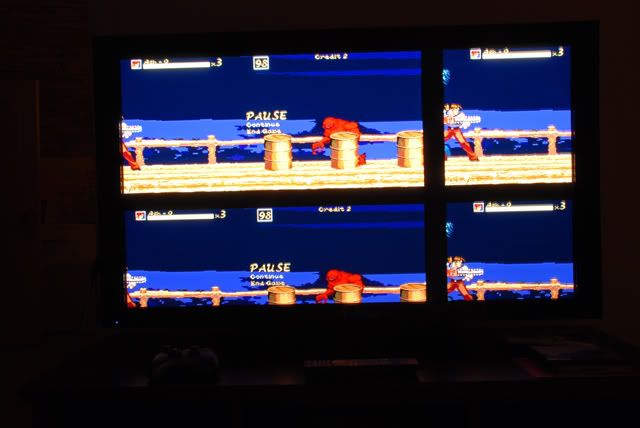
I need help with incorporating tvout. I have been trying to use the dve sample as a basis but for the life of me i can't seem to figure out how to get the image to display full screen properly. I seem to get only the upper portion of the screen displaying the image.
Here is the initialization of the GU.
| Code: | void initGraphics()
{
int cable=0, u=0, width=0, height=0, displaymode=0;
dispBufferNumber = 0;
sceGuInit();
guStart();
sceGuDrawBuffer(GU_PSM_8888, (void*)FRAMEBUFFER_SIZE, LINESIZE);
sceGuDispBuffer(SCREEN_WIDTH, SCREEN_HEIGHT, (void*)0, LINESIZE);
sceGuClear(GU_COLOR_BUFFER_BIT | GU_DEPTH_BUFFER_BIT);
sceGuDepthBuffer((void*) (FRAMEBUFFER_SIZE*2), LINESIZE);
sceGuOffset(2048 - (SCREEN_WIDTH / 2), 2048 - (SCREEN_HEIGHT / 2));
sceGuViewport(2048, 2048, SCREEN_WIDTH, SCREEN_HEIGHT);
sceGuDepthRange(0xc350, 0x2710);
sceGuScissor(0, 0, SCREEN_WIDTH, SCREEN_HEIGHT);
sceGuEnable(GU_SCISSOR_TEST);
sceGuAlphaFunc(GU_GREATER, 0, 0xff);
sceGuEnable(GU_ALPHA_TEST);
sceGuDepthFunc(GU_GEQUAL);
sceGuEnable(GU_DEPTH_TEST);
sceGuFrontFace(GU_CW);
sceGuShadeModel(GU_SMOOTH);
sceGuEnable(GU_CULL_FACE);
sceGuEnable(GU_TEXTURE_2D);
sceGuEnable(GU_CLIP_PLANES);
sceGuTexMode(GU_PSM_8888, 0, 0, 0);
sceGuTexFunc(GU_TFX_REPLACE, GU_TCC_RGBA);
sceGuTexFilter(GU_NEAREST, GU_NEAREST);
sceGuAmbientColor(0xffffffff);
sceGuEnable(GU_BLEND);
sceGuBlendFunc(GU_ADD, GU_SRC_ALPHA, GU_ONE_MINUS_SRC_ALPHA, 0, 0);
sceGuFinish();
sceGuSync(0, 0);
sceDisplayWaitVblankStart();
sceGuDisplay(GU_TRUE);
if(kuKernelGetModel() == PSP_MODEL_SLIM_AND_LITE)
{
cable = pspDveMgrCheckVideoOut();
switch(cable)
{
case 0:
// No Cable
break;
case 1:
// composite, sdtv
u = 2;
width = 720;
height = 503;
displaymode = 0x1D1;
break;
case 2:
// component, (and probably d-terminal too)
u = 0;
width = 720;
height = 480;
displaymode = 0x1D2;
break;
default:
writeToLogFile("Unknown cable %d.\n", cable);
sceKernelDelayThread(5*1000000);
borExit(0);
break;
}
if(cable == 1 || cable == 2)
{
pspDveMgrSetVideoOut(u, displaymode, width, height, 1, 15, 0);
sceDisplaySetFrameBuf((void*)(FRAMEBUFFER_SIZE*2), 1024, PSP_DISPLAY_PIXEL_FORMAT_8888, PSP_DISPLAY_SETBUF_NEXTFRAME);
}
}
initialized = 1;
}
|
Here is one of the functions used for blitting.
| Code: | void blitImageToScreen(int sx, int sy, int width, int height, Image* source, int dx, int dy)
{
if (!initialized) return;
Color* vram = getVramDrawBuffer();
sceKernelDcacheWritebackInvalidateAll();
guStart();
sceGuCopyImage(GU_PSM_8888, sx, sy, width, height, source->textureWidth, source->data, dx, dy, LINESIZE, vram);
sceGuFinish();
sceGuSync(0,0);
}
|
Now does the blitting require some extra work for TvOut support that I'm not aware of?
Here is a snapshot of what is happening:
 |
|
| Back to top |
|
|
J.F.
Joined: 22 Feb 2004
Posts: 2906
|
| Posted: Sat Nov 10, 2007 11:02 am Post subject: |
|
|
You probably haven't changed any of the defines in graphic.c/.h from 480x272 into 720x480. You might want to get the latest source for pmplayer advance - cooleyes has already added TV support to graphics.c/.h.
http://code.google.com/p/pmplayer-advance |
|
| Back to top |
|
|
SamuraiX
Joined: 31 Jan 2006
Posts: 76
Location: USA
|
| Posted: Sun Nov 11, 2007 10:46 am Post subject: |
|
|
Hmm... Still not having any luck but it seems, correct me if I'm wrong. In order to support 720x480 some type of scaling needs to be put in place.
While I'm far from being a video expert it seems he is scaling the video to fit the TV's resolution via his texture_subdivision lib.
If that is the case then that seems to be what I'm missing. What I don't understand is why I see multiple images....
** Updated **
Yep, It seems that was the problem as I'm see much better results after manipulating the vertexs. |
|
| Back to top |
|
|
Wally

Joined: 26 Sep 2005
Posts: 672
|
| Posted: Mon Nov 19, 2007 7:00 pm Post subject: |
|
|
| is there any chance that there could be some sort of plugin to just allow the homebrew to run? |
|
| Back to top |
|
|
gambiting
Joined: 17 Aug 2006
Posts: 154
|
| Posted: Wed Nov 21, 2007 4:49 am Post subject: |
|
|
| SamuraiX wrote: | Hmm... Still not having any luck but it seems, correct me if I'm wrong. In order to support 720x480 some type of scaling needs to be put in place.
While I'm far from being a video expert it seems he is scaling the video to fit the TV's resolution via his texture_subdivision lib.
If that is the case then that seems to be what I'm missing. What I don't understand is why I see multiple images....
** Updated **
Yep, It seems that was the problem as I'm see much better results after manipulating the vertexs. |
I have EXACTLY the same problem - can you guide me how to do it??? |
|
| Back to top |
|
|
J.F.
Joined: 22 Feb 2004
Posts: 2906
|
| Posted: Wed Nov 21, 2007 7:44 am Post subject: |
|
|
| Wally4000 wrote: | | is there any chance that there could be some sort of plugin to just allow the homebrew to run? |
No. Every program is different, so you have to tailor the TV support to the program. |
|
| Back to top |
|
|
Wally
Joined: 26 Sep 2005
Posts: 672
|
| Posted: Wed Nov 21, 2007 8:55 am Post subject: |
|
|
| J.F. wrote: | | Wally4000 wrote: | | is there any chance that there could be some sort of plugin to just allow the homebrew to run? |
No. Every program is different, so you have to tailor the TV support to the program. |
Thanks JF :) |
|
| Back to top |
|
|
MysticWhiteDragon
Joined: 16 Feb 2006
Posts: 30
|
| Posted: Thu Nov 22, 2007 7:29 am Post subject: |
|
|
| Couldn't it be possible to grab the screen data like remotejoy does, but instead of sending it via USB, resize it and send it through the video out? |
|
| Back to top |
|
|
Wally
Joined: 26 Sep 2005
Posts: 672
|
| Posted: Thu Nov 22, 2007 8:47 am Post subject: |
|
|
| maybe eloader instead of having 1.50 kernel could tailor for all the TV support :D |
|
| Back to top |
|
|
J.F.
Joined: 22 Feb 2004
Posts: 2906
|
| Posted: Thu Nov 22, 2007 8:49 am Post subject: |
|
|
| MysticWhiteDragon wrote: | | Couldn't it be possible to grab the screen data like remotejoy does, but instead of sending it via USB, resize it and send it through the video out? |
In theory, yes. You could make a plugin to copy (and scale) the video from where the app drew it to the real framebuffer outputting to the TV. But why? It won't hardly be any better than the existing mechanism for displaying games, the scaling would look ugly, would slow things down, and it wouldn't work with everything. It's like slapping a band-aide on a severed arm. It's better to have program authors add proper TV support to the program.
I suppose someone will eventually make a plugin for that. You'll just have to be patient and hope somebody feels it worthwhile enough to spend the time. |
|
| Back to top |
|
|
moonlight
Joined: 26 Oct 2005
Posts: 567
|
| Posted: Sat Nov 24, 2007 3:18 am Post subject: |
|
|
| MysticWhiteDragon wrote: | | Couldn't it be possible to grab the screen data like remotejoy does, but instead of sending it via USB, resize it and send it through the video out? |
The data is not "sent". The tv-out gets it directly from the framebuffer.
The thing can be achieved by setting the DmaLcdcBaseAddr to your memory, destroying the function to avoid it being set again, and painting the screen (copying it to the true framebuffer that you set) in each vertical sync interrupt from the framebuffer that was set by sceDisplaySetFrameBuf but that didn't arrived to sceDmaLcdcSetBaseAddr because you avoided it.
I've done a test in which i simply copied the game framebuffer to my framebuffer (the "real" one), without scaling, just copying it like it is. It was TERRIBLY SLOW, even skipping some frames. Only in psx games the speed was fine (they use 16 bits color mode), but when i tried to do some scaling, the psx game also got slow.
Project canceled :) |
|
| Back to top |
|
|
SamuraiX
Joined: 31 Jan 2006
Posts: 76
Location: USA
|
| Posted: Tue Nov 27, 2007 3:44 am Post subject: |
|
|
| gambiting wrote: | | SamuraiX wrote: | Hmm... Still not having any luck but it seems, correct me if I'm wrong. In order to support 720x480 some type of scaling needs to be put in place.
While I'm far from being a video expert it seems he is scaling the video to fit the TV's resolution via his texture_subdivision lib.
If that is the case then that seems to be what I'm missing. What I don't understand is why I see multiple images....
** Updated **
Yep, It seems that was the problem as I'm see much better results after manipulating the vertexs. |
I have EXACTLY the same problem - can you guide me how to do it??? |
You can grab the source here: http://openbor.svn.sourceforge.net/viewvc/openbor/
Goto PSP directory then take a look at graphics.c/h
The implementation is based off of Cooleyes' graphic lib. But I found there was alot of overhead that was not needed for what I am doing. I also like having my Blit(s)toScreen perform their own start and flush unlike his version where he manages it within his application (Outside of graphics lib). Lastly, I did like how he managed his pointers for LCD or TV-Out and found it extremely efficient and easy to read!
Good Luck! |
|
| Back to top |
|
|
MysticWhiteDragon
Joined: 16 Feb 2006
Posts: 30
|
| Posted: Sun Dec 02, 2007 11:14 pm Post subject: |
|
|
I managed to get 32Bit interlaced mode to work in a test program at 10 frames per second using memcpy from the framebuffer to VRAM. Is there any speed advantage by pointing the VRAM to the framebuffer that is drawn and if so then how would I go about doing I do it?
It's based off of a port of the NeHe-GU tutorial on another site so I will just add the graphics.c I used.
graphics.c
| Code: |
#include <string.h>
#include <stdio.h>
#include <malloc.h>
#include <pspkernel.h>
#include <pspdisplay.h>
#include <pspdebug.h>
#include <pspgu.h>
#include <pspgum.h>
#include <pspctrl.h>
#include <psprtc.h>
#include "graphics.h"
#include "CTimer.h"
u32* globalVramBase = (u32*)(0x40000000|0x04000000);
unsigned int __attribute__((aligned(16))) dList[262144];
static void* frameBuffer[2];
static int displayBufferNumber;
static int interlaced;
int BUFFER_WIDTH = 512;
int SCREEN_WIDTH = 480;
int SCREEN_HEIGHT = 272;
int tvmode = 0;
int cable = 0;
int pspDveMgrCheckVideoOut();
int pspDveMgrSetVideoOut(int,int,int,int,int,int,int);
void initGraphics()
{
displayBufferNumber = 0;
frameBuffer[0] = (void*)0x0a000000;
frameBuffer[1] = (void*)(0x0a000000 + 1572864);
sceGuInit();
sceGuStart(GU_DIRECT,dList);
sceGuDrawBuffer(GU_PSM_8888,(void*)0,BUFFER_WIDTH);
sceGuDispBuffer(SCREEN_WIDTH,SCREEN_HEIGHT,(void*)0, BUFFER_WIDTH);
sceGuDepthBuffer((void*)(BUFFER_WIDTH * SCREEN_HEIGHT * 4),BUFFER_WIDTH);
sceGuOffset(2048 - (SCREEN_WIDTH/2),2048 - (SCREEN_HEIGHT/2));
sceGuViewport(2048,2048,SCREEN_WIDTH,SCREEN_HEIGHT);
sceGuDepthRange(65535,0);
sceGuScissor(0,0,SCREEN_WIDTH,SCREEN_HEIGHT);
sceGuEnable(GU_SCISSOR_TEST);
sceGuDepthFunc(GU_GEQUAL);
sceGuEnable(GU_DEPTH_TEST);
sceGuFrontFace(GU_CW);
sceGuEnable(GU_CULL_FACE);
sceGuShadeModel(GU_SMOOTH);
sceGuEnable(GU_CLIP_PLANES);
sceGuFinish();
sceGuSync(0,0);
memset(frameBuffer[0],0,1572864);
memset(frameBuffer[1],0,1572864);
sceDisplayWaitVblankStart();
sceGuDisplay(GU_TRUE);
sceDisplaySetFrameBuf(frameBuffer[displayBufferNumber],768, PSP_DISPLAY_PIXEL_FORMAT_8888,PSP_DISPLAY_SETBUF_IMMEDIATE);
}
void checkCable()
{
cable = pspDveMgrCheckVideoOut();
}
void setTVMode(int mode)
{
switch(mode)
{
case 0:
SCREEN_WIDTH = 480; SCREEN_HEIGHT = 272; BUFFER_WIDTH = 512; interlaced = 0;
pspDveMgrSetVideoOut(0,0,480,272,1,15,0);
break;
case 1:
SCREEN_WIDTH = 720; SCREEN_HEIGHT = 480; BUFFER_WIDTH = 768; interlaced = 1;
pspDveMgrSetVideoOut(0,0x1d1,720,503,1,15,0);
break;
case 2:
SCREEN_WIDTH = 720; SCREEN_HEIGHT = 480; BUFFER_WIDTH = 768; interlaced = 0;
pspDveMgrSetVideoOut(0,0x1d2,720,480,1,15,0);
break;
case 3:
SCREEN_WIDTH = 720; SCREEN_HEIGHT = 480; BUFFER_WIDTH = 768; interlaced = 1;
pspDveMgrSetVideoOut(2,0x1d1,720,503,1,15,0);
break;
}
}
void SetupProjection()
{
sceGuStart(GU_DIRECT,dList);
sceGumMatrixMode(GU_PROJECTION);
sceGumLoadIdentity();
sceGumPerspective(75.0f,16.0f/9.0f,0.5f,1000.0f);
sceGumMatrixMode(GU_VIEW);
sceGumLoadIdentity();
sceGuClearColor(GU_COLOR(0.0f,0.0f,0.0f,1.0f));
sceGuClearDepth(0);
sceGuFinish();
}
void flipScreen()
{
// if (!initialized) return;
sceKernelDcacheWritebackInvalidateAll();
if(interlaced)
{
void* s0 = globalVramBase;
void* d0 = frameBuffer[displayBufferNumber];
void* d1 = d0 + 262*3072;
int i;
for(i = 0;i < 240;i++)
{
memcpy(d1,s0,3072);
d1 += 3072;
s0 += 3072;
memcpy(d0,s0,3072);
d0 += 3072;
s0 += 3072;
}
}
else memcpy(frameBuffer[displayBufferNumber],globalVramBase,1474560);
sceDisplayWaitVblankStart();
sceDisplaySetFrameBuf(frameBuffer[displayBufferNumber], 768, PSP_DISPLAY_PIXEL_FORMAT_8888, PSP_DISPLAY_SETBUF_IMMEDIATE);
displayBufferNumber ^= 1;
}
void guStart()
{
sceGuStart(GU_DIRECT,dList);
}
|
|
|
| Back to top |
|
|
SamuraiX
Joined: 31 Jan 2006
Posts: 76
Location: USA
|
| Posted: Wed Dec 19, 2007 3:55 pm Post subject: |
|
|
MysticWhiteDragon,
I have completed my update of the Graphics lib. It will now display Composite, Progressive and Interlaced modes. Feel free to reference my version. I ran a few test to see the performance of my graphics lib. Mind you these results are based on my own application.
LCD Screen: 200 fps
Component P: 197 fps
Component I: 120 fps
Composite: 120 fps
You will see that you get better fps with my implementation for Interlaced modes but there is no way to make it as fast as Progressive mode due to using system ram for interlacing and vram for progressive.
http://openbor.svn.sourceforge.net/viewvc/openbor/psp/
Good Luck! |
|
| Back to top |
|
|
el_yind
Joined: 08 Feb 2008
Posts: 1
|
| Posted: Fri Feb 08, 2008 10:21 am Post subject: |
|
|
| SamuraiX wrote: | MysticWhiteDragon,
I have completed my update of the Graphics lib. It will now display Composite, Progressive and Interlaced modes. Feel free to reference my version. I ran a few test to see the performance of my graphics lib. Mind you these results are based on my own application.
LCD Screen: 200 fps
Component P: 197 fps
Component I: 120 fps
Composite: 120 fps
You will see that you get better fps with my implementation for Interlaced modes but there is no way to make it as fast as Progressive mode due to using system ram for interlacing and vram for progressive.
http://openbor.svn.sourceforge.net/viewvc/openbor/psp/
Good Luck! |
So, using your library could someone make a plug for the CFW to play games using the composite cable in TV.
I only have televisors that support composite and I'm sure there are a lot of people too, so that could be really good to could connect it to those tvs.
At least don't stop trying to do that project as I read DAX gave up with that.
Thanks! |
|
| Back to top |
|
|
gambiting
Joined: 17 Aug 2006
Posts: 154
|
| Posted: Fri Feb 08, 2008 5:14 pm Post subject: |
|
|
| el_yind wrote: | | SamuraiX wrote: | MysticWhiteDragon,
I have completed my update of the Graphics lib. It will now display Composite, Progressive and Interlaced modes. Feel free to reference my version. I ran a few test to see the performance of my graphics lib. Mind you these results are based on my own application.
LCD Screen: 200 fps
Component P: 197 fps
Component I: 120 fps
Composite: 120 fps
You will see that you get better fps with my implementation for Interlaced modes but there is no way to make it as fast as Progressive mode due to using system ram for interlacing and vram for progressive.
http://openbor.svn.sourceforge.net/viewvc/openbor/psp/
Good Luck! |
So, using your library could someone make a plug for the CFW to play games using the composite cable in TV.
I only have televisors that support composite and I'm sure there are a lot of people too, so that could be really good to could connect it to those tvs.
At least don't stop trying to do that project as I read DAX gave up with that.
Thanks! |
No,no,no - his library only changes functions in graphic.h file,which I bet sony doesn't use :P And as for enabling composite output in official games....someone already did it,but result was something like 2-3 fps,so completely unplayable.You see,interlacing takes processor time,and cannot be used while simultaniously playing games. |
|
| Back to top |
|
|
Snigel
Joined: 28 Jan 2008
Posts: 5
|
| Posted: Sun Feb 10, 2008 1:34 am Post subject: |
|
|
Would it be possible to render just the even lines and then just the odd lines at next frame?
So instead of interlacing frame 1 into odd lines and even lines and then rendering it,
Render frame 1 with odd lines, render frame 2 with even lines. Output the interlaced picture directly.
Of course this will lower image quality but, this would not require any memory copying nor as much cpu-processing. Since the renderer would just render half of lines every time, the render speed would possibly make up for the sloppy "interlace".
The hard part to implement is a renderer that will be able to switch between rendering odd and even lines.
Just for fun:
The Voodoo 2 cards was able to render odd or even lines from a picture. This was used in SLI-mode where the odd and even lines from the cards were put together into the progressive image on screen. |
|
| Back to top |
|
|
OldPrisoneR
Joined: 20 Mar 2008
Posts: 53
|
| Posted: Fri Mar 21, 2008 7:35 am Post subject: |
|
|
| moonlight wrote: | | MysticWhiteDragon wrote: | | Couldn't it be possible to grab the screen data like remotejoy does, but instead of sending it via USB, resize it and send it through the video out? |
The data is not "sent". The tv-out gets it directly from the framebuffer.
The thing can be achieved by setting the DmaLcdcBaseAddr to your memory, destroying the function to avoid it being set again, and painting the screen (copying it to the true framebuffer that you set) in each vertical sync interrupt from the framebuffer that was set by sceDisplaySetFrameBuf but that didn't arrived to sceDmaLcdcSetBaseAddr because you avoided it.
I've done a test in which i simply copied the game framebuffer to my framebuffer (the "real" one), without scaling, just copying it like it is. It was TERRIBLY SLOW, even skipping some frames. Only in psx games the speed was fine (they use 16 bits color mode), but when i tried to do some scaling, the psx game also got slow.
Project canceled :) |
Moonlight, couldn't you provide source code of ur test programm?
P.S: I've just written a little plugin which switches the psp TVout On (in composite mode), when you are in the game.
But the picture is not good :p
because of the FrameBuffer :(
For interlace mode we need interlaced frmbuffer(240,22,240,1), Am I right?)
P.S.S:I've tested it with God of War, FlatOut and Patapon.
Speed was fine, surely playable!
With PS1 games (Tekken3) speed was not perfect (I think I now why :P)
All tests were done with 222MHz! |
|
| Back to top |
|
|
fiorello
Joined: 21 Jun 2008
Posts: 14
|
| Posted: Sat Jun 21, 2008 11:33 pm Post subject: |
|
|
Hello,
the case is that i used moonlight dve sample for making my homebrew display on a big screen but compilers say that:
main.c:(.text+0xd04): undefined reference to `pspDveMgrCheckVideoOut'
main.c:(.text+0xd6c): undefined reference to `pspDveMgrSetVideoOut'
main.c:(.text+0x10b0): undefined reference to `pspDveMgrCheckVideoOut'
but those functions are included here:
int pspDveMgrCheckVideoOut();
int pspDveMgrSetVideoOut(int u, int mode, int width, int height, int x, int y, int z);
But im not sure excatly what part of code is important to changing to TV(coz' the sample display some random colors that I don't need anyway).
here's the psp-to-tv-changing-code:
| Code: | //tv
int pspDveMgrCheckVideoOut();
int pspDveMgrSetVideoOut(int u, int mode, int width, int height, int x, int y, int z);
int cable, u, width, height, displaymode;
pspDebugScreenInit();
if (sceKernelDevkitVersion() < 0x03070110)
{
oslFatalError("This program requires 3.71+.\n");
}
if (pspSdkLoadStartModule("dvemgr.prx", PSP_MEMORY_PARTITION_KERNEL) < 0)
{
oslFatalError("Error in load/start module.\n");
}
cable = pspDveMgrCheckVideoOut();
if (cable == 0)
{
printf("Insert a videoout cable.\n");
while (cable == 0)
{
sceKernelDelayThread(10000);
cable = pspDveMgrCheckVideoOut();
}
}
if (cable != 1 && cable != 2)
{
oslFatalError("Unknown cable %d.\n", cable);
}
if (cable == 1) // composite, sdtv
{
u = 2;
width = 720;
height = 503;
displaymode = 0x1D1;
}
else // 2, component, (and probably d-terminal too)
{
u = 0;
width = 720;
height = 480;
displaymode = 0x1D2;
}
pspDveMgrSetVideoOut(u, displaymode, width, height, 1, 15, 0);
|
|
|
| Back to top |
|
|
|
|
You cannot post new topics in this forum
You cannot reply to topics in this forum
You cannot edit your posts in this forum
You cannot delete your posts in this forum
You cannot vote in polls in this forum
|
Powered by phpBB © 2001, 2005 phpBB Group
|
 FAQ
FAQ Search
 Memberlist
 Usergroups
 Register
 Profile
 Log in to check your private messages
 Log in


