 |
forums.ps2dev.org
Homebrew PS2, PSP & PS3 Development Discussions
|
| View previous topic :: View next topic |
| Author |
Message |
Zuofu
Joined: 10 Jun 2008
Posts: 5
|
 Posted: Tue Jun 10, 2008 10:08 pm Post subject: Drawing 2D textured polygon (LTE/PSPGL) Posted: Tue Jun 10, 2008 10:08 pm Post subject: Drawing 2D textured polygon (LTE/PSPGL) |
 |
|
Is there a way to draw a 2D polygon which is textured? I couldn't find anything in the LTE documentation - I found some 2D polygon functions, but it was for concyclic (on a circle) polygons, as opposed to polygons with arbitrary (2D) vertices.
I suspect that at some point in the graphics pipeline (post transform) the PSP has to be able to draw 2D polygons and fill them with textures (e.g. triangle setup and texturing). Is there a way to access this low-level functionality easily through PSPGL?
I could probably hack the transform matrix into something that basically projects the whole scene onto the screen in an orthographic way. However, it's kinda gross to do this because I would like to address polygons in 2D integer pixels as opposed to some abstract 3-space floating point stuff.
By the way, I'm doing this because I'm working on a Ultima Online client for the PSP. UO's terrain is 2.5D, so certain "fill" polygons need to be created in order to interpolate between 2D terrain "tiles".
Zuofu |
|
| Back to top |
|
 |
J.F.
Joined: 22 Feb 2004
Posts: 2906
|
| Posted: Wed Jun 11, 2008 12:47 am Post subject: |
|
|
| For LTE, look at the 2D graphics example (06). For GU, look at the multitude of sprite samples. You can't swing a cat without hitting a 2D sample on the PSP. |
|
| Back to top |
|
|
Zuofu
Joined: 10 Jun 2008
Posts: 5
|
| Posted: Wed Jun 11, 2008 3:43 am Post subject: |
|
|
I looked at example 6 for LTE, but it only has rectangles. There doesn't seem to be a corresponding feature to draw arbitrary polygons.
I think this picture will illustrate what I'm trying to do better:
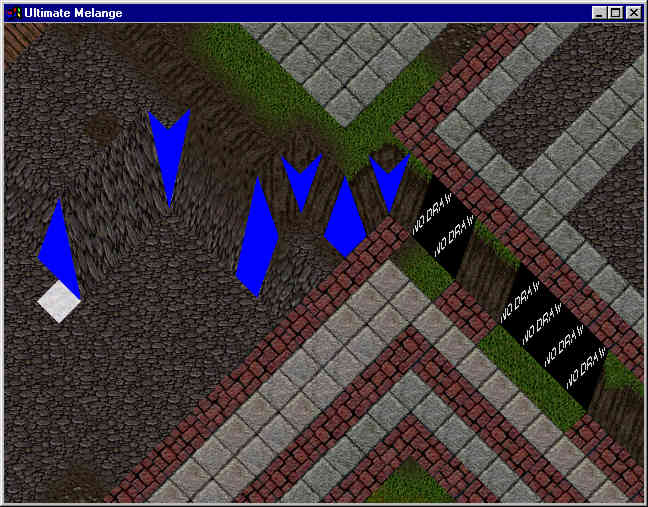
Basically the whole world is 2D, but I would like to be able to draw textured polygons where the blue placeholder stuff is. Notice that they are not really regular shapes (not even convex) except that they all have < 4 vertices. The vertices are also 2D screen coordinates and not 3D points in space. Also the 2D texture would have to be stretched and filtered to make it look right.
Thanks!
Zuofu |
|
| Back to top |
|
|
J.F.
Joined: 22 Feb 2004
Posts: 2906
|
| Posted: Wed Jun 11, 2008 4:33 am Post subject: |
|
|
Sounds like what you want is a 3D triangle, but projected to 2D. I've threads on that here in the past. I suggest you search this forum (PSP Development) for the term "projection". You get a lot of threads that aren't helpful, but you can quickly skim for the ones that are helpful.
This isn't really a PSP question, but a game programming question. You might find a better answer on a site dedicated to something like OpenGL or DX game construction. |
|
| Back to top |
|
|
Zuofu
Joined: 10 Jun 2008
Posts: 5
|
| Posted: Wed Jun 11, 2008 12:20 pm Post subject: |
|
|
Got it - Thanks. I looked it up in the OpenGL FAQ:
9.030 How do I draw 2D controls over my 3D rendering?
The basic strategy is to set up a 2D projection for drawing controls. You can do this either on top of your 3D rendering or in overlay planes. If you do so on top of a 3D rendering, you'll need to redraw the controls at the end of every frame (immediately before swapping buffers). If you draw into the overlay planes, you only need to redraw the controls if you're updating them.
To set up a 2D projection, you need to change the Projection matrix. Normally, it's convenient to set up the projection so one world coordinate unit is equal to one screen pixel, as follows:
glMatrixMode (GL_PROJECTION); glLoadIdentity (); gluOrtho2D (0, windowWidth, 0, windowHeight);
gluOrtho2D() sets up a Z range of -1 to 1, so you need to use one of the glVertex2*() functions to ensure your geometry isn't clipped by the zNear or zFar clipping planes.
Normally, the ModelView matrix is set to the identity when drawing 2D controls, though you may find it convenient to do otherwise (for example, you can draw repeated controls with interleaved translation matrices).
If exact pixelization is required, you might want to put a small translation in the ModelView matrix, as shown below:
glMatrixMode (GL_MODELVIEW); glLoadIdentity (); glTranslatef (0.375, 0.375, 0.);
If you're drawing on top of a 3D-depth buffered image, you'll need to somehow disable depth testing while drawing your 2D geometry. You can do this by calling glDisable(GL_DEPTH_TEST) or glDepthFunc (GL_ALWAYS). Depending on your application, you might also simply clear the depth buffer before starting the 2D rendering. Finally, drawing all 2D geometry with a minimum Z coordinate is also a solution.
After the 2D projection is established as above, you can render normal OpenGL primitives to the screen, specifying their coordinates with XY pixel addresses (using OpenGL-centric screen coordinates, with (0,0) in the lower left). |
|
| Back to top |
|
|
fungos
Joined: 31 Oct 2007
Posts: 41
Location: cwb br
|
| Posted: Sat Jun 14, 2008 10:43 am Post subject: |
|
|
Zuofu, your project is very interesting for me (I thought to try develop it some time ago). If do you want some help with it, let's talk.
Anyway, there are some old attempts to develop a Ultima Online client in C/C++ out there, maybe you can find some useful code floating. |
|
| Back to top |
|
|
Zuofu
Joined: 10 Jun 2008
Posts: 5
|
| Posted: Sun Jun 15, 2008 7:38 pm Post subject: |
|
|
| Awesome - I sent you a PM |
|
| Back to top |
|
|
|
|
You cannot post new topics in this forum
You cannot reply to topics in this forum
You cannot edit your posts in this forum
You cannot delete your posts in this forum
You cannot vote in polls in this forum
|
Powered by phpBB © 2001, 2005 phpBB Group
|
 FAQ
FAQ Search
 Memberlist
 Usergroups
 Register
 Profile
 Log in to check your private messages
 Log in


