 |
forums.ps2dev.org
Homebrew PS2, PSP & PS3 Development Discussions
|
| View previous topic :: View next topic |
| Author |
Message |
ps2devman
Joined: 09 Oct 2006
Posts: 265
|
 Posted: Fri Jan 12, 2007 8:43 pm Post subject: Programmer's Notepad : smallest devtool for ps2dev Posted: Fri Jan 12, 2007 8:43 pm Post subject: Programmer's Notepad : smallest devtool for ps2dev |
 |
|
PN2 (Programmer's Notepad v2.6.0.1) is free and can be found here :
http://www.pnotepad.org
The mass of code I'm handling is becoming really huge, and I felt the need to have some tool able to take me right to the faulty line when a compilation error occurs, even if I'm just using cygwin alone (i.e you type "make" in a cygwin window to compile programs).
PN2 brought me that instantly (Pn doesn't need to be installed, just put it in any directory).
Here is how I've attached F9 key to an automatic make+report errors/send binary to console operation :
- copy cygwin.bat in order to create cygwin_make.bat (in \cygwin)
- at top of cygwin_make.bat, add this line :
set AUTOMAKE=ON
- in your account directory, add this line in .bashrc file :
(assuming your project is in subdirectory myproject):
if [ -n "$AUTOMAKE" ]; then cd myproject; make; exit; fi
Now if cygwin_make.bat is launched instead of cygwin.bat, session opens, make is done, session is closed.
In PN2, now, go in Tools->Options. Select Tools on bottom left. Select "(None) - Global tools" in Scheme combolist at top. Click Add. Fill in the fields :
Name: Make
Command: c:\cygwin\cygwin_make.bat
Folder: <full path to your project files, or file won't be shown when you click an error report line>
Shortcut: F9 (select field and press F9)
Save: All files
Now just hit F9 to save, make, and eventually send to console (if your makefile launch ftp2xbox.bat or ps2client.exe - see Pong makefile for example)
You can also save the list (.pnws) of all the text files you opened so they can be opened automatically later, if you associate .pnws to pn.exe, and double click .pnws file.
(I bet this method can still be improved) |
|
| Back to top |
|
 |
Henk
Joined: 29 Dec 2006
Posts: 14
|
| Posted: Fri Jan 12, 2007 10:34 pm Post subject: |
|
|
Thanks for the info. I downloaded it and will have a look at it.
Since I'm developing on a linux system (I never bothered with that cygwin stuff) I will try out how I can get the same stuff done via ssh and samba.
If I get it to work I'll post a howto :) |
|
| Back to top |
|
|
ubergeek42
Joined: 13 Jul 2005
Posts: 83
|
| Posted: Sat Jan 13, 2007 6:26 am Post subject: |
|
|
| That looks nice, I've been using eclipse for a while, but this looks slicker, and probably less prone to crashing. |
|
| Back to top |
|
|
J.F.
Joined: 22 Feb 2004
Posts: 2906
|
| Posted: Sat Jan 13, 2007 9:28 am Post subject: |
|
|
| Folks on a linux system would be better off using gedit for lightweight programming. It has the same kind of functionality the original poster talks about plus a bit more. If you want something a bit more extensive, but not nearly as heavy as Eclipse, try Code Blocks. That's in the Fedora Extras repo, among other places. |
|
| Back to top |
|
|
dlanor
Joined: 28 Oct 2004
Posts: 269
Location: Stockholm, Sweden
|
| Posted: Sun Jan 14, 2007 9:15 pm Post subject: Re: Programmer's Notepad : smallest devtool for ps2dev |
|
|
| ps2devman wrote: | Here is how I've attached F9 key to an automatic make+report errors/send binary to console operation :
- copy cygwin.bat in order to create cygwin_make.bat (in \cygwin)
- at top of cygwin_make.bat, add this line :
set AUTOMAKE=ON
- in your account directory, add this line in .bashrc file :
(assuming your project is in subdirectory myproject):
if [ -n "$AUTOMAKE" ]; then cd myproject; make; exit; fi
Now if cygwin_make.bat is launched instead of cygwin.bat, session opens, make is done, session is closed.
|
This way of launching 'make' through a BAT file reminds me slightly of how I do things myself, except that I have made my BAT files accept drag-drop of files to invoke bash, in such a way that all the Cygwin tools, including 'make' itself, will be properly invoked from bash, instead of being invoked from the command line interpreter of Windows.
Possibly I misunderstood your method, but it seems to me that it is still the Windows CLI which (via BAT) launches the 'make.exe' of Cygwin. This may cause some PS2 projects to fail, as they need to execute 'make' under bash.
My own method relies on having some shortcuts on the desktop, onto which I can drag-drop files for processing. Thus I have one icon for 'make all', another for 'make clean', etc, onto which I can drag-drop a makefile from any PS2 (or other Cygwin-based) project. I also have a similar 'bash' icon, onto which I can drag-drop any bash script for execution. And in all those drag-drop cases, I've arranged it so that bash will switch to the drag-drop source folder before starting any processing. Thus all such processing will work exactly as if I had started bash manually, navigated to the proper project folder, and there issued the appropriate 'make' or script commands by hand.
Naturally there is no way a simple BAT script can do all that by itself, so I use a mixture of BAT files and SH files invoked from the top level BAT file, so as to build a modified DD_init.rc for each invocation, and this file is referenced (when it exists only) from the main .bashrc, in order to pass argument and launch folder info from the Windows BAT into the bash script for each command variant. I'm sure similar methods can be found to let your invocation method launch 'make' properly from bash as well.
I've posted an archive with these scripts of mine here quite some time ago, though it has most likely drowned in other stuff by this time. But you can probably find it by searching old posts by me, or if you like I could even repost it.
Best regards: dlanor |
|
| Back to top |
|
|
sparrow
Joined: 13 Apr 2006
Posts: 24
|
| Posted: Mon Jan 15, 2007 4:14 am Post subject: |
|
|
Hi folks!
I use Crimson Editor + BAT file (which spawns bash, so all make process is done under cygwin, not under windows).
Here are the contents of my RUN.BAT file:
| Code: |
c:\cygwin\bin\bash -c 'export WORK_PATH=`pwd`; /bin/bash --login -c "cd \"$WORK_PATH\"; %1 %2 %3 %4 %5"' |
Here is my Crimson's Editor config for the F9 key shortcut (which calls MAKE):
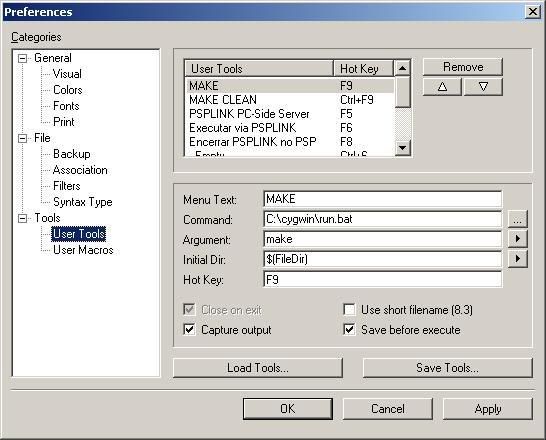
Another thing we must set are environment variables under cygwin (c:\cygwin\etc\bash.bashrc). Here are the contents of my bash.bashrc file (I use the same config above for PSPSDK as well. Works great!):
| Code: | # base-files version 3.7-1
# WARNING
#
# IF THIS bash IS MODIFIED IT WILL NOT BE UPDATED BY THE CYGWIN
# SETUP PROGRAM. IT BECOMES YOUR RESPONSIBILITY.
#
# The latest version as installed by the Cygwin Setup program can
# always be found at /etc/defaults/etc/bash.bashrc
# System-wide .bashrc file
## PS2DEV SETTINGS
export PS2DEV="/usr/local/ps2dev"
export PS2SDK="$PS2DEV/ps2sdk"
export PATH="$PATH:$PS2DEV/bin:$PS2DEV/ee/bin:$PS2DEV/iop/bin"
export PATH="$PATH:$PS2DEV/dvp/bin:$PS2SDK/bin"
## PSPSDK SETTINGS
export PSPSDK="/usr/local/pspdev"
export PATH="$PATH:/usr/local/pspdev/bin"
|
This way, my Crimson Editor + Toolchain works like professional SDK
Hope these tips help you guys to get a better programming environment! ;)
Best regards,
bootsector |
|
| Back to top |
|
|
ps2devman
Joined: 09 Oct 2006
Posts: 265
|
| Posted: Mon Jan 15, 2007 10:50 am Post subject: |
|
|
| Wow thanks a lots. I will try it. |
|
| Back to top |
|
|
ps2devman
Joined: 09 Oct 2006
Posts: 265
|
| Posted: Sat Jan 20, 2007 8:18 pm Post subject: |
|
|
Mmm... -c doesn't seem to work for my bash, but you gave me ideas for some improvement for the pn2 method
(it's strange, I have the feeling pn2 is a just another version of crimson editor, window seems strangely similar)
new method for pn2 (more flexible) :
add this to cygwin.bat (after echo off and before the call to bash) :
set CYGWINPARAM1=%1
set CYGWINPARAM2=%2
set CYGWINPARAM3=%3
set CYGWINPARAM4=%4
set CYGWINPARAM5=%5
add this to .bashrc (so it's executed by bash, no problem):
if [ -n "$CYGWINPARAM1" ]; then
cd $CYGWINPARAM1
if [ -n "$CYGWINPARAM2" ]; then
$CYGWINPARAM2 $CYGWINPARAM3 $CYGWINPARAM4 $CYGWINPARAM5
fi
exit
fi
In PN2, now, go in Tools->Options. Select Tools on bottom left. Select "(None) - Global tools" in Scheme combolist at top. Click Add. Fill in the fields :
Name: Make
Command: c:\cygwin\cygwin.bat
Folder: %d
Parameters: %d make
Shortcut: F9 (select field and press F9)
Save: All files
Name: Make clean
Command: c:\cygwin\cygwin.bat
Folder: %d
Parameters: %d make clean
Shortcut: F12 (select field and press F12)
Save: All files |
|
| Back to top |
|
|
ps2devman
Joined: 09 Oct 2006
Posts: 265
|
| Posted: Tue Feb 20, 2007 10:37 pm Post subject: |
|
|
To assemble .vsm (consider it as a vertex/pixel shader source on PS2)
into an object file .o :
Name: Dvp-as
Command: c:\cygwin\cygwin.bat
Folder: %d
Parameters: %d /usr/local/ps2dev/dvp/bin/dvp-as %n.vsm -o %n.o
Shortcut: F4 (select field and press F4)
Save: All files
(since errors are reported the standard way, clicking an error line takes you correctly to line in .vsm source)
Saotome's little 'vulib' seems the easiest way to directly use the .o contents afterwards from within .elf code.
(http://forums.ps2dev.org/viewtopic.php?t=2812) |
|
| Back to top |
|
|
ps2devman
Joined: 09 Oct 2006
Posts: 265
|
| Posted: Wed Feb 21, 2007 12:23 am Post subject: |
|
|
To compile .vcl (easy to read Vu Command Line preprocessor source)
into a .vsm source
Name: Vcl
Command: c:\cygwin\cygwin.bat
Folder: %d
Parameters: %d vcl_14beta7 -o%n.vsm -G %n.vcl
Shortcut: F7 (select field and press F7)
Save: All files
You can find vcl_14beta7 here:
http://playstation2-linux.com/projects/vcl/
Note that I use -G instead of -g because I don't have ee-gasp.
So I use cpp macro expander instead of ee-gasp
(#define instead of .crap)
These Parameters reach the limit of 5 parameters, so, if you need more parameters, of course, add more constants in cygwin.bat and .bashrc |
|
| Back to top |
|
|
ps2devman
Joined: 09 Oct 2006
Posts: 265
|
| Posted: Wed Feb 21, 2007 8:24 pm Post subject: |
|
|
Well... it seems that no using gasp is quite insane...
After seaching through forums posts, I could finally obtain gasp.
With it, nice .vcl samples out there can be finally optimized into .vsm.
Name: Vcl (optimizes ps2 .vcl into .vsm)
Command: c:\cygwin\cygwin.bat
Folder: %d
Parameters: %d gasp_vcl.sh %n.vcl %n.vsm
Shortcut: F7 (select field and press F7)
Save: All files
This tool will modify the current file: Yes
If you are lazy, all you need is this archive :
http://home.tele2.fr/~fr-51785/ps2_gasp_vcl.zip
If you want the details, here they are :
gasp_vcl.sh and other binaries must be copied into /usr/local/bin
gasp_vcl.sh contents ("masp -P ." is similar to "gasp"):
masp -P . $CYGWINPARAM3 | vcl_14beta7 -o$CYGWINPARAM4
(.vcl/.vsm in PS2 world are similar to .cg/.vsh in Nvidia world)
Useful links :
vcl comes from here: http://playstation2-linux.com/projects/vcl/ (vcl.1.4.beta7.x86.tgz)
vulib can be found here: http://forums.ps2dev.org/viewtopic.php?t=2812 (vu-lib.zip)
masp comes from here: http://cosmos.raunvis.hi.is/~johannos/masp/ (masp-0.1.16.tar.gz)
Masp compiles with errors. Here is what you have to fix if you want to recompile it:
1) liberty/getpagesize.c : just comment the whole function getpagesize (exists already)
2) liberty/vsprintf.c : replace #include <varargs.h> with #include <stdarg.h>
3) src/masp.c, line 4282 : Add the missing final \ (PN2 will show the line in purple)
Nasty issue found in Masp :
For example, in basic.vcl (from one of the great vcl samples), you find this line :
mat_x_mat Transform, LocalWorld, ScreenMat ; mat_x_mat nm,lm,rm nm = lm x rm
mat_x_mat is a macro defined in vumacros.m, but won't be expanded at all because of the trailing comment. You will have to remove any comment found behind macros (or break line). |
|
| Back to top |
|
|
ps2devman
Joined: 09 Oct 2006
Posts: 265
|
| Posted: Mon Feb 26, 2007 10:31 pm Post subject: |
|
|
Name: Addr2line (a window will pop up to ask for the hexa address)
Command: c:\cygwin\cygwin.bat
Folder: %d
Parameters: %d addr2line -e test.elf %?
Shortcut: F4 (select field and press F4)
Save: None |
|
| Back to top |
|
|
|
|
You cannot post new topics in this forum
You cannot reply to topics in this forum
You cannot edit your posts in this forum
You cannot delete your posts in this forum
You cannot vote in polls in this forum
|
Powered by phpBB © 2001, 2005 phpBB Group
|
 FAQ
FAQ Search
 Memberlist
 Usergroups
 Register
 Profile
 Log in to check your private messages
 Log in


