 |
forums.ps2dev.org
Homebrew PS2, PSP & PS3 Development Discussions
|
| View previous topic :: View next topic |
| Author |
Message |
Ghoti
Joined: 31 Dec 2005
Posts: 288
|
 Posted: Wed Aug 29, 2007 12:24 am Post subject: Update and render large number of triangles Posted: Wed Aug 29, 2007 12:24 am Post subject: Update and render large number of triangles |
 |
|
Hi folks,
I am in doubt to what to use. I'm trying to build this particle engine and now I have to decide how to act next. I have this particle class which holds position, velocity, update function and thats it. Now I'm going to make the emitter. The problem is that this way i can create a render function inside the particle class and then call the render function N times but that is not the best way I guess (?). So i decided to retrieve the position per particle and store those in an array of vertices and then only call the render function once passed with N * 4 vertices in 1 array so that it fast?
Particle systems in 3D use triangles that are rotated to face the camera. How is this done the fastest? altering the vertices with sin and cos functions? or is there a better way of doing this?
hope that you guys can answer some questions.
greets ghoti
_________________
My PSP games:
Boxy II: http://www.ghoti.nl/boxyii.php
Elementals: http://www.ghoti.nl/Elementals.php |
|
| Back to top |
|
 |
flatmush
Joined: 07 Aug 2007
Posts: 28
Location: Here
|
| Posted: Wed Aug 29, 2007 12:39 am Post subject: |
|
|
| I think that the easiest way is to use GU_SPRITES as they require only 2 verts and are always facing the camera so no maths is involved. |
|
| Back to top |
|
|
Ghoti
Joined: 31 Dec 2005
Posts: 288
|
|
| Back to top |
|
|
flatmush
Joined: 07 Aug 2007
Posts: 28
Location: Here
|
| Posted: Wed Aug 29, 2007 1:44 am Post subject: |
|
|
| GU_SPRITES is only 2d if you specify GU_TRANSFORM_2D, just like triangles and lines it can also be 3d, but it just always faces the camera. |
|
| Back to top |
|
|
Ghoti
Joined: 31 Dec 2005
Posts: 288
|
| Posted: Sat Sep 01, 2007 9:20 pm Post subject: |
|
|
hmmm well here is what I do but it does not seem to work :S
| Code: | void Particle::Render() {
DisplayVertices[0].u = 0.0f;
DisplayVertices[0].v = 0.0f;
//DisplayVertices[0].color = 10;
DisplayVertices[0].x = this->position_.x - 0.5f;
DisplayVertices[0].y = this->position_.y;
DisplayVertices[0].z = this->position_.z - 0.5f;
DisplayVertices[1].u = 1.0f;
DisplayVertices[1].v = 1.0f;
//DisplayVertices[0].color = 10;
DisplayVertices[1].x = this->position_.x + 0.5f;
DisplayVertices[1].y = this->position_.y;
DisplayVertices[1].z = this->position_.z + 0.5f;
sceGuDrawArray(GU_SPRITES, GU_TEXTURE_32BITF | GU_VERTEX_32BITF | GU_TRANSFORM_3D, 2, 0, this->DisplayVertices);
} |
here are the declarations and the struct
| Code: | Particle::Particle(ScePspFVector3 pos, ScePspFVector3 vel, int life) {
this->DisplayVertices = (vertexParticle*) sceGuGetMemory(2 * sizeof(vertexParticle));
this->position_ = pos;
this->velocity_ = vel;
if(life<0)
this->life_ = 0;
else
this->life_ = life;
} |
and
| Code: | typedef struct { float u, v;
float x, y, z; } vertexParticle; // vertex to render |
At the beginning of the particlestream I see sometimes a block (just a microsecond) in front of my car so that I won't see the opponent but an exhaust trail is not to be seen :s any thoughts about the code above ?
_________________
My PSP games:
Boxy II: http://www.ghoti.nl/boxyii.php
Elementals: http://www.ghoti.nl/Elementals.php |
|
| Back to top |
|
|
flatmush
Joined: 07 Aug 2007
Posts: 28
Location: Here
|
| Posted: Sat Sep 01, 2007 9:53 pm Post subject: |
|
|
The gu get memory only allocates memory on the display list for this frame I believe, instead of using it in the constructor, use it at the top of the drawing code so that it gets the memory each time it draws.
sceGuGetMemory is not like a malloc routine. |
|
| Back to top |
|
|
Ghoti
Joined: 31 Dec 2005
Posts: 288
|
|
| Back to top |
|
|
Raphael

Joined: 17 Jan 2006
Posts: 646
Location: Germany
|
| Posted: Sun Sep 02, 2007 4:21 am Post subject: |
|
|
Why offset the .z values? If you use an identity view you'd need to offset the x and y coordinates to get a billboard. For any other view you'd need to get the up and right vectors and add/subtract those.
If you don't need the perspective projection, then just transform the vertices manually by your view matrix and use TRANSFORM_2D and offset x and y always (by pixels though).
_________________
<Don't push the river, it flows.>
http://wordpress.fx-world.org - my devblog
http://wiki.fx-world.org - VFPU documentation wiki
Alexander Berl |
|
| Back to top |
|
|
tacoSunday

Joined: 31 Aug 2007
Posts: 34
|
| Posted: Sun Sep 02, 2007 5:02 am Post subject: |
|
|
GU_SPRITES are NOT automatically billboarded! You must do the alignment yourself. This seems to be most easily done when you are building your sprite array.
First you would extract your up and right vectors from the transform matrix after you have done your view transformations. I the example below the up and right vectors are combined into one up plus right vector
| Code: |
void getUpPlusRight(float *upr)
{
ScePspFMatrix4 m;
sceGumStoreMatrix(&m);
// up + right
upr[0] = m.x.x + m.x.y;
upr[1] = m.y.x + m.y.y;
upr[2] = m.z.x + m.z.y;
}
|
It is then a simple matter to use this vector to build your screen-aligned GU_SPRITES.
| Code: |
void buildPSysSprites(pSystem *psys, guVertex *v_buf, float *u_plus_r)
{
unsigned int i, j = 0;
particle *p_buf;
float half_size;
p_buf = (particle *)psys->partRing->buf;
for(i = 0; i < psys->max_parts; i++)
{
if(p_buf[i].alive)
{
half_size = p_buf[i].size * 0.5f;
v_buf[j].u = 0;
v_buf[j].v = 0;
v_buf[j].color = p_buf[i].color;
v_buf[j].x = p_buf[i].pos[0] - u_plus_r[0] * half_size;
v_buf[j].y = p_buf[i].pos[1] - u_plus_r[1] * half_size;
v_buf[j].z = p_buf[i].pos[2] - u_plus_r[2] * half_size;
j++;
v_buf[j].u = 1;
v_buf[j].v = 1;
v_buf[j].color = p_buf[i].color;
v_buf[j].x = p_buf[i].pos[0] + u_plus_r[0] * half_size;
v_buf[j].y = p_buf[i].pos[1] + u_plus_r[1] * half_size;
v_buf[j].z = p_buf[i].pos[2] + u_plus_r[2] * half_size;
j++;
}
}
}
|
Good luck and happy coding! |
|
| Back to top |
|
|
Ghoti
Joined: 31 Dec 2005
Posts: 288
|
| Posted: Sun Sep 02, 2007 8:11 pm Post subject: |
|
|
Hi folks,
@raphael: This may sound a little noobish but as far as I know I use an identity view and then translate and rotate it. just setting the x and y as offset did not work: | Code: | void Particle::Render() {
vertexParticle* DisplayVertices = (vertexParticle*) sceGuGetMemory(2 * sizeof(vertexParticle));
DisplayVertices[0].u = 0.0f;
DisplayVertices[0].v = 0.0f;
//DisplayVertices[0].color = 10;
DisplayVertices[0].x = this->position_.x - 0.5f;
DisplayVertices[0].y = this->position_.y - 0.5f;
DisplayVertices[0].z = 0.0f;
DisplayVertices[1].u = 1.0f;
DisplayVertices[1].v = 1.0f;
//DisplayVertices[0].color = 10;
DisplayVertices[1].x = this->position_.x + 0.5f;
DisplayVertices[1].y = this->position_.y + 0.5f;
DisplayVertices[1].z = 0.0f;
sceGuDrawArray(GU_SPRITES, GU_TEXTURE_32BITF | GU_VERTEX_32BITF | GU_TRANSFORM_3D, 2, 0, DisplayVertices);
} |
@tacoSunday: So i use that piece of code just after i set the view matrix? and then the only thing I have to do is add or substract it from the position? i'll try that and will let you know
_________________
My PSP games:
Boxy II: http://www.ghoti.nl/boxyii.php
Elementals: http://www.ghoti.nl/Elementals.php |
|
| Back to top |
|
|
tacoSunday
Joined: 31 Aug 2007
Posts: 34
|
| Posted: Sun Sep 02, 2007 8:34 pm Post subject: |
|
|
Unless you are working in 2D you will need to set the depth( z ). As it is now you will never see the sprites because they on the same plane as your camera. This means in front of your near clipping plane.
| Code: |
void Particle::Render() {
vertexParticle* DisplayVertices = (vertexParticle*) sceGuGetMemory(2 * sizeof(vertexParticle));
DisplayVertices[0].u = 0.0f;
DisplayVertices[0].v = 0.0f;
//DisplayVertices[0].color = 10;
DisplayVertices[0].x = this->position_.x - 0.5f;
DisplayVertices[0].y = this->position_.y - 0.5f;
DisplayVertices[0].z = this->position_.z;
DisplayVertices[1].u = 1.0f;
DisplayVertices[1].v = 1.0f;
//DisplayVertices[0].color = 10;
DisplayVertices[1].x = this->position_.x + 0.5f;
DisplayVertices[1].y = this->position_.y + 0.5f;
DisplayVertices[1].z = this->position_.z;
sceGuDrawArray(GU_SPRITES, GU_TEXTURE_32BITF | GU_VERTEX_32BITF | GU_TRANSFORM_3D, 2, 0, DisplayVertices);
}
|
As long as the depth for both points is the same the sprite will remain aligned (assuming an identity view). |
|
| Back to top |
|
|
tacoSunday
Joined: 31 Aug 2007
Posts: 34
|
| Posted: Sun Sep 02, 2007 9:04 pm Post subject: |
|
|
Just throwing this out there but you may want to build all of your particle sprites at one time and then just call sceGuDrawArray once. Also each call to sceGuGetMemory incurs overhead in the display list. Allocate all the memory you need for the particle systems sprites with one call to sceGuGetMemory(per frame of course). While having your particles take care of their own updating and sprite building is is redolent with the fumes of OO goodness, it is bad for performance. Remember that you are dealing with hundreds to thousands of particles each frame. The less baggage your particles lug around the better. If you insist on using c++ classes then I suggest that you restrict it to the particle system itself and the particle system manager if you make one. Let the particles themselves be as lean and mean as possible(ie just an array of structs). Anyways keep fighting the good fight!
P.S. If you want so see a working example (in c) let me know and I can e-mail it to you or something.
Edit: silly typo
Last edited by tacoSunday on Sun Sep 02, 2007 9:09 pm; edited 1 time in total |
|
| Back to top |
|
|
Raphael
Joined: 17 Jan 2006
Posts: 646
Location: Germany
|
| Posted: Sun Sep 02, 2007 9:09 pm Post subject: |
|
|
| Ghoti wrote: | Hi folks,
@raphael: This may sound a little noobish but as far as I know I use an identity view and then translate and rotate it. just setting the x and y as offset did not work:
|
A rotated or translated identity view is no longer identity, hence why you need to extract the right and up vectors then. Exactly as taco said.
_________________
<Don't push the river, it flows.>
http://wordpress.fx-world.org - my devblog
http://wiki.fx-world.org - VFPU documentation wiki
Alexander Berl |
|
| Back to top |
|
|
Ghoti
Joined: 31 Dec 2005
Posts: 288
|
| Posted: Mon Sep 03, 2007 12:33 am Post subject: |
|
|
Hi again :)
here is what i have now:
| Code: |
void ParticleExhaust::renderParticles() {
int j;
// set the texture
sceGuTexFunc(GU_TFX_REPLACE, GU_TCC_RGB);
sceGuTexFilter(GU_LINEAR, GU_LINEAR);
sceGuTexScale(1.0f, 1.0f);
sceGuTexOffset(0.0f, 0.0f);
sceGuTexImage(0, particleTexture->textureWidth, particleTexture->textureHeight, particleTexture->textureWidth, (void*)particleTexture->data);
// set some other stuff
vertexParticle* DisplayVertices = (vertexParticle*) sceGuGetMemory(this->nrParticles_ * 2 * sizeof(vertexParticle));
// create the vertice list
for(unsigned int i=0;i < this->nrParticles_ ; i++) {
j = i*2;
DisplayVertices[j].u = 0.0f;
DisplayVertices[j].v = 0.0f;
//DisplayVertices[j].color = 10;
DisplayVertices[j].x = particles.at(i)->x - trans_.x * 3.5f;
DisplayVertices[j].y = particles.at(i)->y - trans_.y * 3.5f;
DisplayVertices[j].z = particles.at(i)->z - trans_.z * 3.5f;
DisplayVertices[j+1].u = 1.0f;
DisplayVertices[j+1].v = 1.0f;
//DisplayVertices[i+1].color = 10;
DisplayVertices[j+1].x = particles.at(i)->x + trans_.x * 3.5f;
DisplayVertices[j+1].y = particles.at(i)->y + trans_.y * 3.5f;
DisplayVertices[j+1].z = particles.at(i)->z + trans_.z * 3.5f;
}
sceGuDrawArray(GU_SPRITES, GU_TEXTURE_32BITF | GU_VERTEX_32BITF | GU_TRANSFORM_3D, 2 * this->nrParticles_, 0, DisplayVertices);
}
bool ParticleExhaust::update() {
if(this->nrParticles_ < this->maxNrParticles_) {
// add a particle if there are not enough
Particle* newParticle = new Particle;
newParticle->velx = 0.0f;
newParticle->vely = 0.0f;
newParticle->velz = 0.0f;
newParticle->x = this->position_.x;
newParticle->y = this->position_.y;
newParticle->z = this->position_.z;
newParticle->life = 100;
particles.push_back(newParticle);
this->nrParticles_++;
}
// update every particle
for(int i=0;i < this->nrParticles_; i++) {
particles.at(i)->life--;
if (particles.at(i)->life > 0) {
// handle the update event
// resize it to get pointy trail
}
else {
// delete it from memory
delete(particles.at(i));
particles.erase(particles.begin()+i);
this->nrParticles_--;
}
}
return true;
} |
And i still see nothing, it should if i understand your code correctly :s
There is one thing though that may be causing the problem; when I created the view the first time, I did not do it correctly but now I am stuck with it (too much code to alter if I alter it.)
I do the translation and rotation multiplication in the wrong order (well wrong, I have to use - signs for position and stuff.)
camera function:
| Code: | void Camera::setCamera(Player* plyr) {
// Load
matrix_identity((float*)&projection);
matrix_projection((float*)&projection,65.0f,16.0f/9.0f,2.1f,400.0f);
sceGuSetMatrix(GU_PROJECTION,&projection);
matrix_identity((float*)&view);
matrix_identity((float*)&view2);
matrix_rotate((float*)&view2, 0, (plyr->rotation.y), 0);
correctedPosition = VectorRotate(plyr->rotation.y);
matrix_translate((float*)&view2,(plyr->getPosition().x + (-(correctedPosition.x /*- plyr->correction.x*/) * 10)), plyr->getPosition().y - 3, (plyr->getPosition().z + (-(correctedPosition.z /*- plyr->correction.z*/) * 10)));
matrix_multiply((float*)&view, (float*)&view2, (float*)&view);
sceGuSetMatrix(GU_VIEW,&view);
position.x = plyr->getPosition().x + (-(correctedPosition.x) * 10);
position.y = plyr->getPosition().y + 3;
position.z = plyr->getPosition().z + (-(correctedPosition.z) * 10);
return;
}; |
hope that you guys can see something wrong about it.
p.s. have checked and the particles are present so that should not be the problem.
EDIT:: here is how i get the matrix:
| Code: | ScePspFMatrix4 m;
ScePspFVector3 trans;
sceGumStoreMatrix(&m);
// up + right
trans.x = m.x.x + m.x.y;
trans.y = m.y.x + m.y.y;
trans.z = m.z.x + m.z.y; |
_________________
My PSP games:
Boxy II: http://www.ghoti.nl/boxyii.php
Elementals: http://www.ghoti.nl/Elementals.php |
|
| Back to top |
|
|
tacoSunday
Joined: 31 Aug 2007
Posts: 34
|
| Posted: Mon Sep 03, 2007 11:53 am Post subject: |
|
|
Hey there, I just took a quick glance at your code. Your transformation code definitely looks a bit wonky. Instead of building your matrices by hand and then multiplying them in, I suggest making use if the sceGum stacked matrix functions. They are much more straight forward. The procedure is generally as follows:
| Code: |
sceGumMatrixMode(GU_PROJECTON);
sceGumLoadIdentity();
sceGumPerspective( perspective parameters );
sceGumMatrixMode(GU_VIEW);
sceGumLoadIdentity();
// View transformations in form of
sceGumTranslate(&trans_vector);
sceGumRotateXYZ(&rot_vector);
// extract your up and right vectors here
sceGumMatrixMode(GU_MODEL);
// apply model transformations same way as you do view transformations.
|
Now I could be wrong as I have never actually checked, but the order in witch you set your matrices doesn't matter. They will all be applied in the correct order by the GUM. Individual trasformations, rotations and such do depend on the order that they are applied to each matrix.
The sceGum functions are very similar to the way openGL handles these things. It would probably be quite helpful to find some good documentation on openGL as the methodology is very much the same(the openGL redbook comes to mind). |
|
| Back to top |
|
|
Ghoti
Joined: 31 Dec 2005
Posts: 288
|
| Posted: Mon Sep 03, 2007 6:22 pm Post subject: |
|
|
Hiya,
well I think it does matter because otherwise you can't rotate the camera around some point and only use a FPS kind of camera. anyway, my code is just to large to change this now, because everything is inverted, every little bit of code is inverted :s anyway, it should work the same only with some different things set. Can you take a look at the other code maybe, maybe you see something that I did wrong :s
greets ghoti
_________________
My PSP games:
Boxy II: http://www.ghoti.nl/boxyii.php
Elementals: http://www.ghoti.nl/Elementals.php |
|
| Back to top |
|
|
tacoSunday
Joined: 31 Aug 2007
Posts: 34
|
| Posted: Tue Sep 04, 2007 4:24 am Post subject: |
|
|
What I meant was that it doesn't matter what order you define your MATRICES in, weather it be projection then model then view, or view then projection then model or whatever. The order of individual rotations and translations applied to these matrices certainly does matter as you say. If your code is too complex to change these things then you probably need to rethink how you are going about it.
I have taken the liberty of simplifying your setCamera method.
| Code: |
void Camera::setCamera(Player* plyr
{
sceGumMatrixMode(GU_PROJECTION);
sceGumLoadIdentity();
sceGumPerspective(75.0f,16.0f/9.0f,0.5f,1000.0f);
sceGumMatrixMode(GU_VIEW);
sceGumLoadIdentity();
sceGumLookAt(&(plyr.position), &(plyr.direction), &(plyr.up));
// I dont know what your player class contains, so I am making it up!
// Just change to suit you. plyr.position, .direction and .up are all of type ScePspFVector3
// plyr.up is the up vector you desire. {0, 1, 0} means y is up.
// This is great for making your player lean. just rotate {0,1,0} in the direction you wish to lean.
}
|
I think you will agree it is much clearer and therefore easier to change in the future! |
|
| Back to top |
|
|
Ghoti
Joined: 31 Dec 2005
Posts: 288
|
| Posted: Tue Sep 04, 2007 5:15 am Post subject: |
|
|
Well the camera settings I use is a camera that follows the player until a certain angle and then the camera halts and the player can rotate just a little more.
and the problem is, when I use this system I will have to change everywhere in my code that the objects really are at the position and not at the the negative position :s it is a little bit strange to explain.
but the view aside can there be something wrong with the code
I am thinking to do it just with trianglestrips, is this alot slower? (because of the use of sin and cos to rotate the strips to face the view or can I use the viewmatrix just as you describe ?
_________________
My PSP games:
Boxy II: http://www.ghoti.nl/boxyii.php
Elementals: http://www.ghoti.nl/Elementals.php |
|
| Back to top |
|
|
tacoSunday
Joined: 31 Aug 2007
Posts: 34
|
| Posted: Tue Sep 04, 2007 8:42 am Post subject: |
|
|
It might be helpful if you tried to isolate your particle system from the rest of your code to make testing it easier. Assuming that you are using good programming practice, you should be able to take your particle system class and wire it up to a test stub. Have the stub try to build and render the particle system at a point you know is in the view frustum. This will enable you to determine if the issue is in the particle system or somewhere else like your camera transforms.
Alas, this may not be possible. In this case I suggest trying to render as simple GU_POINTS to determine if the particles are indeed where you expect them to be. If they are then try to render as GU_SPRITES with an arbitrary alignment and a solid color instead of a texture. If all goes well you should see your sprites, just not aligned to the view. Then try aligning them. You should keep enabling functionality until your code finally breaks. This will give you a much better idea of where to look for the problem.
I wish I could give you a more definite answer, but it is impossible from just looking at isolated chunks of code. As you say, the error could be totally unrelated to your transformation and alignment code. The only way to find out is logical deduction and process of elimination.
Best of luck. |
|
| Back to top |
|
|
Smong
Joined: 04 Sep 2007
Posts: 82
|
| Posted: Wed Sep 05, 2007 4:39 am Post subject: |
|
|
| Ghoti wrote: | | Code: | // update every particle
for(int i=0;i < this->nrParticles_; i++) {
particles.at(i)->life--;
if (particles.at(i)->life > 0) {
// handle the update event
// resize it to get pointy trail
}
else {
// delete it from memory
delete(particles.at(i));
particles.erase(particles.begin()+i);
this->nrParticles_--;
}
} |
|
There's a problem with this code, when you are removing particles you have this->nrParticles_-- but you also have i < this->nrParticles_ as the loop condition. Strange things will happen depending on how you implemented your particle list, I would expect to see a few particles skipped (not drawn) in a few odd frames. |
|
| Back to top |
|
|
Ghoti
Joined: 31 Dec 2005
Posts: 288
|
|
| Back to top |
|
|
Ghoti
Joined: 31 Dec 2005
Posts: 288
|
| Posted: Thu Sep 06, 2007 12:44 am Post subject: |
|
|
Hiya,
@tacoSunday: I have tried to alter the camera to the code you provided but It is no use :(, When I change it the camera functions no longer how it should. It does not follow the player anymore.
HEY i found something out... If I use 0.0f, 0.0f, 0.0f as the base position for the particlesystem then it renders it (using trianglestrips, not sprites) at the middle of the car, I render the car first and then I render the particles but with the particles I do not use any matrix multiplications so I GUESS it uses the one of my plane for it.
fixed it and now I have a trail :D:D:D
only thing to do is get it to face the camera all the time.
Since I use trianglestrips now to make a particle, how can i use the view matrix on the vertices now ?
_________________
My PSP games:
Boxy II: http://www.ghoti.nl/boxyii.php
Elementals: http://www.ghoti.nl/Elementals.php |
|
| Back to top |
|
|
tacoSunday
Joined: 31 Aug 2007
Posts: 34
|
| Posted: Fri Sep 07, 2007 6:14 am Post subject: |
|
|
The procedure is the same, you just have more points to define now.
Adding the right and up vectors during extraction was an optimization for creating square centered GU_SPRITE's. A more generalized tristrip version follows.
| Code: |
void getUpVec(float *up)
{
ScePspFMatrix4 m;
sceGumStoreMatrix(&m);
up[0] = m.x.x;
up[1] = m.y.x;
up[2] = m.z.x;
}
void getRightVec(float *right)
{
ScePspFMatrix4 m;
sceGumStoreMatrix(&m);
right[0] = m.x.y;
right[1] = m.y.y;
right[2] = m.z.y;
}
void buildPSysTriStrips(pSystem *psys, guVertex *v_buf, float *up, float *right)
{
unsigned int i, j = 0;
particle *p_buf;
float half_w, half_h;
p_buf = (particle *)psys->partRing->buf;
for(i = 0; i < psys->max_parts; i++)
{
if(p_buf[i].alive)
{
half_size = p_buf[i].size * 0.5f;
// a = center - (right + up) * size;
v_buf[j].u = 0;
v_buf[j].v = 0;
v_buf[j].color = p_buf[i].color;
v_buf[j].x = p_buf[i].pos[0] - (right[0] + up[0]) * half_size;
v_buf[j].y = p_buf[i].pos[1] - (right[1] + up[1]) * half_size;
v_buf[j].z = p_buf[i].pos[2] - (right[2] + up[2]) * half_size;
j++;
// b = center + (right - up) * size;
v_buf[j].u = 1;
v_buf[j].v = 1;
v_buf[j].color = p_buf[i].color;
v_buf[j].x = p_buf[i].pos[0] + (right[0] - up[0]) * half_size;
v_buf[j].y = p_buf[i].pos[1] + (right[1] - up[1]) * half_size;
v_buf[j].z = p_buf[i].pos[2] + (right[2] - up[2]) * half_size;
j++;
// c = center + (right + up) * size;
v_buf[j].u = 0;
v_buf[j].v = 0;
v_buf[j].color = p_buf[i].color;
v_buf[j].x = p_buf[i].pos[0] + (right[0] + up[0]) * half_size;
v_buf[j].y = p_buf[i].pos[1] + (right[1] + up[1]) * half_size;
v_buf[j].z = p_buf[i].pos[2] + (right[2] + up[2]) * half_size;
j++;
// d = center - (right - up) * size;
v_buf[j].u = 1;
v_buf[j].v = 1;
v_buf[j].color = p_buf[i].color;
v_buf[j].x = p_buf[i].pos[0] - (right[0] - up[0]) * half_size;
v_buf[j].y = p_buf[i].pos[1] - (right[1] - up[1]) * half_size;
v_buf[j].z = p_buf[i].pos[2] - (right[2] - up[2]) * half_size;
j++;
}
}
}
|
Please note that if you feed the vertex array to sceGuDrawArray in one fell swoop, it will not work as expected. Since the particles are not connected, each must be represented as its own tristrip. You will have to feed it 4 verts at a time. This is why GU_SPRITES is far more efficient.
Have you tried GU_SPRITES again, now that you have it working? If not, it would be very beneficial to your particle systems performance. From your last post I glean that your problem was not with GU_SPRITE's but simply goobered transforms.
Taco out. |
|
| Back to top |
|
|
Vincent_M
Joined: 03 Apr 2007
Posts: 73
|
| Posted: Fri Sep 07, 2007 7:38 am Post subject: |
|
|
That code worked for me! Also, I noticed that when your particles' life is equal to 0 (I'm guessing false), you delete it from memory. Adding and deleting particles from memory is slow, and can fragment your ram up pretty good once done enough, which can cause it to be ungodly slower more and more with allocation errors after a while.
What I suggest is that you just don't render that particle when it's dead. If you decide to render the entire particle system all in one sceGuDrawArray() function call, you'll just want to move that dead particle from wherever it is in the linked list to the tail, and subtract 2 from the amount of vertices to render in sceGuDrawArray(). Still, your vertices must be in a vertex array too, so that may not work depending on how you implement it. You might want to adjust a few things, but all in all, it'll work out. If you don't need the particle system at all, however, just delete if from memory altogether in one shot (possibly on a separate thread). That way, you'll keep your framrate high and healthy. ;) |
|
| Back to top |
|
|
Ghoti
Joined: 31 Dec 2005
Posts: 288
|
| Posted: Fri Sep 07, 2007 10:34 am Post subject: |
|
|
@tacoSunday: sprites work now also but very incorrect, I see color but that is everything. You said that the trianglestrip need to be called every time but when I do not i get this behaviour (with depth writing on):
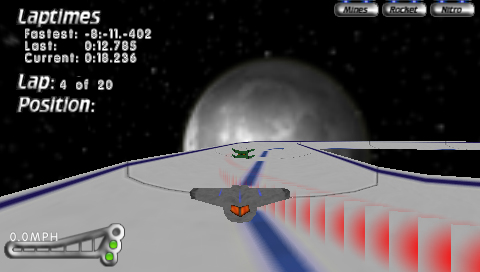
It looks as if the quads are rendered without a problem ?
The view thing just won't do the trick. The resulting quad are rendered always in the same direction.
I can get them right by getting the angle of the camera and then rotating the vertices using that angle using sine and cosine however this is very slow and bad I guess ? With the viewmatrix thing you provided it just not faces the camera, I have tried setting a lot of different + and - in the vertices but the behaviour does not even change :s
I have printed out the matrix retrieved and the right parts are always the same, every frame, even when I translate and rotate the camera.
| Code: | camera->setCamera(player);
// camera is set, get matrix for particles
ScePspFMatrix4 m;
ScePspFVector3 up, right;
sceGumStoreMatrix(&m);
// up + right
up.x = m.x.x; // + m.x.y;
up.y = m.y.x; //+ m.y.y;
up.z = m.z.x; // + m.z.y;
right.x = m.x.y;
right.y = m.y.y;
right.z = m.z.y;
DebugTools::PrintText("x = ", right.x);
DebugTools::PrintText("y = ", right.y);
DebugTools::PrintText("z = ", right.z); |
and the camera function sets the view:
| Code: | sceGumMatrixMode(GU_PROJECTION);
sceGumLoadIdentity();
sceGumPerspective(65.0f,16.0f/9.0f,2.1f,400.0f);
matrix_identity((float*)&view);
matrix_identity((float*)&view2);
matrix_rotate((float*)&view2, 0, (plyr->rotation.y), 0);
correctedPosition = VectorRotate(plyr->rotation.y);
matrix_translate((float*)&view2,(plyr->getPosition().x + (-(correctedPosition.x) * 10)), plyr->getPosition().y - 3, (plyr->getPosition().z + (-(correctedPosition.z) * 10)));
matrix_multiply((float*)&view, (float*)&view2, (float*)&view);
sceGuSetMatrix(GU_VIEW,&view);
//position = trans;
position.x = plyr->getPosition().x + (-(correctedPosition.x) * 10);
position.y = plyr->getPosition().y + 3;
position.z = plyr->getPosition().z + (-(correctedPosition.z) * 10);
return; |
apperantly it does not get the view matrix, is this because I leave the camera function and then it does not have the last matrix in memory anymore ?
P.S. sorry that this takes so long, and thanks for sticking to it!
_________________
My PSP games:
Boxy II: http://www.ghoti.nl/boxyii.php
Elementals: http://www.ghoti.nl/Elementals.php |
|
| Back to top |
|
|
Vincent_M
Joined: 03 Apr 2007
Posts: 73
|
| Posted: Fri Sep 07, 2007 12:54 pm Post subject: |
|
|
I noticed a few things. First off, you only need to setup your projection matrix during your initialization before your game loop. You can still call it inside the game loop if you wanted to change the projection matrix for special effects though, but if not, you don't need to set it up anymore than once. That way, fixing that'll give you a speedup.
Also, are you drawing your billboards with GU_STRIP? You actually don't have to make them quads. You can speed up your code by using GU_SPRITE and transforming it in 3D. That way, you only need two vertices. Here's my code to render a billboard:
| Code: |
bool cTexture::BlitBillboard(float XPos, float YPos, float ZPos, ScePspFMatrix4 *ViewMat,
int SrcX, int SrcY, int DestX, int DestY, float ScaleX, float ScaleY, unsigned int Color)
{
// Check to see if there is a valid sprite to load, otherwise the function is cancelled
if(Loaded == false)
return false;
// Set the texture to the sprite
sceGuTexImage( 0, imageWidth, imageHeight, imageWidth, (void*)image);
// Sprite vertices
sBillboardVertex* Vertex = (sBillboardVertex*) sceGuGetMemory(2 * sizeof(sBillboardVertex));
// Transform the billboard
sceGumLoadIdentity();
// Cap off the source and destination values
if(SrcX < 0) SrcX = 0;
if(SrcY < 0) SrcY = 0;
if(DestX > imageWidth) DestX = imageWidth;
if(DestY > imageHeight) DestY = imageHeight;
// Setup the vertex position and blitting data
Vertex[0].s=(float)SrcX/(float)imageWidth;
Vertex[0].t=(float)SrcY/(float)imageHeight;
Vertex[0].x= (XPos + 0.5f*(float)(DestX - SrcX)*(ViewMat->x.x + ViewMat->x.y))*ScaleX;
Vertex[0].y= (YPos + 0.5f*(float)(DestY - SrcY)*(ViewMat->y.x + ViewMat->y.y))*ScaleY;
Vertex[0].z= (ZPos + 0.5f*(float)(DestX - SrcX)*(ViewMat->z.x + ViewMat->z.y))*ScaleX;
Vertex[1].s=(float)DestX/(float)imageWidth;
Vertex[1].t=(float)DestY/(float)imageHeight;
Vertex[1].x= (XPos - 0.5f*(float)(DestX - SrcX)*(ViewMat->x.x + ViewMat->x.y))*ScaleX;
Vertex[1].y= (YPos - 0.5f*(float)(DestY - SrcY)*(ViewMat->y.x + ViewMat->y.y))*ScaleY;
Vertex[1].z= (ZPos - 0.5f*(float)(DestX - SrcX)*(ViewMat->z.x + ViewMat->z.y))*ScaleX;
// Setup render color and blit the sprite to the screen
sceGuColor(Color);
sceGumDrawArray(GU_SPRITES, GU_TEXTURE_32BITF | GU_VERTEX_32BITF | GU_TRANSFORM_3D, 2, 0, Vertex);
return true;
}
|
This code isn't the most optimized, but it's still fast from what I've seen. What I'd do to make this quicker is just save all the function's parameters to an sSpriteBlit instance. Then, every time I blit a billboard with this sprite, I'd just create a linked list of the parameter data so that I can sceGuGetMemory once, and sceGumDrawArray once. All I would have to do to allocate the correct number of vertices is just take the number of links in the linked list, and multiply it times two, and that'll give me the amount of vertices to allocate and draw for that frame. I'd probably do all the blit calls outside of the game loop, or at a loading time so I don't keep creating a new linked list every frame though. All in all, I think that would make your billboards quick, and if you don't want to do that optimization, the code I posted at least works. ;)
Anyway, really cool game; you got a name for it yet? I've got one kinda like it, but it's a shooter like StarFox 64 with a 'twist' to it.
Last edited by Vincent_M on Fri Sep 07, 2007 1:36 pm; edited 1 time in total |
|
| Back to top |
|
|
tacoSunday
Joined: 31 Aug 2007
Posts: 34
|
| Posted: Fri Sep 07, 2007 1:21 pm Post subject: |
|
|
Looks like Vincent_m has the right idea. I really think you need to go back to the drawing board and work out your transform matrices correctly. But just out of curiosity, what happens if you use the up and right vectors from your model matrix? If you are using your model matrix for both view and model transformations(witch I suspect since you say your up and right vectors never change even though your camera does), the view matrix probably wont help.
As far as optimization goes, Vincent is absolutely right about constantly allocating and freeing your particles. It's a bit tricky, but I use a modified ring buffer to keep rolling the pointer around a pool of particles. Another far less tricky method is to allocate a pool of particles, and track them in 2 linked lists. One for active particles, and one for dead particles. When you need new particles, pop them out of the dead list, and into the active list. When they die do the reverse.
Cheers. |
|
| Back to top |
|
|
Ghoti
Joined: 31 Dec 2005
Posts: 288
|
| Posted: Sat Sep 08, 2007 12:42 am Post subject: |
|
|
Hi, IT WORKS !!!! the particles are now always facing the camera :) whiehieeee!!!
thank you guys for your help
Vincent_M: Yes I have set the projection now with the loading of the level and that works so that is some speed increase :D thanks for that. I'll look into the other optimizations also, thanks.
The sprites do not work as of yet but I will use the triangle strips instead and will look into the sprites sometime later on, now I want to continue with the game :)
@tacoSunday: Thank you for sticking to the thread and for the help !
_________________
My PSP games:
Boxy II: http://www.ghoti.nl/boxyii.php
Elementals: http://www.ghoti.nl/Elementals.php |
|
| Back to top |
|
|
tacoSunday
Joined: 31 Aug 2007
Posts: 34
|
| Posted: Sat Sep 08, 2007 10:35 am Post subject: |
|
|
| Glad to hear it. What finally did it? |
|
| Back to top |
|
|
Vincent_M
Joined: 03 Apr 2007
Posts: 73
|
| Posted: Sat Sep 08, 2007 11:26 am Post subject: |
|
|
Can't wait to see this game in action!
Also, I don't want to beat this dead with a stick, but if you were wondering how GU_SPRITES works, you just have to take out the two middle vertices in your vertex array for every quad you draw.
For example, you have theses four vertices to make a quad:
| Code: |
// top-left
(-1.0f, 1.0f, 0.0f)
// top-right
( 1.0f, 1.0f, 0.0f) // take this one out
// bottom-left
(-1.0f, -1.0f, 0.0f) // take this one out
// bottom-right
( 1.0f, -1.0f, 0.0f)
|
In this diagram, the o's are the vertex positions you need. Note that there are only two of them:
o---+
| |
+---o
If you use the four vertices from the example above, they'll be positioned like so:
1 2
3 4
If you draw these four vertices with GU_SPRITES, you get this:
o---o
o---o
As you can see, the first two vertices are connected, and the second two vertices are connected. The only thing is that you only see lines, and no fill because these four vertices are treated as two separate shapes although they're drawn with the same function. All you need to do is just get rid of the 2nd and 3rd vertices, and you'll get this instead:
o---x
| |
x---o
That should cut your processing down by 50% theoretically! ;) You'll only have to deal with half the vertex texture coordinates, and half the vertex positions each call to sceGuDrawArray(). Now, I think the processor will have to compensate for the two vertices that aren't there, but there's hardware to back it up, and that'll be quicker anyway because the real slow to this is the transferring and processing of the vertex data, not the actual rendering. |
|
| Back to top |
|
|
|
|
You cannot post new topics in this forum
You cannot reply to topics in this forum
You cannot edit your posts in this forum
You cannot delete your posts in this forum
You cannot vote in polls in this forum
|
Powered by phpBB © 2001, 2005 phpBB Group
|
 FAQ
FAQ Search
 Memberlist
 Usergroups
 Register
 Profile
 Log in to check your private messages
 Log in


